Have you received a 32665 text message and wondered who sent it or whether your account is safe? You’re not alone. Seeing a message from a five-digit number can be confusing, especially when it contains a verification code, a password-reset notice, or an unfamiliar link.
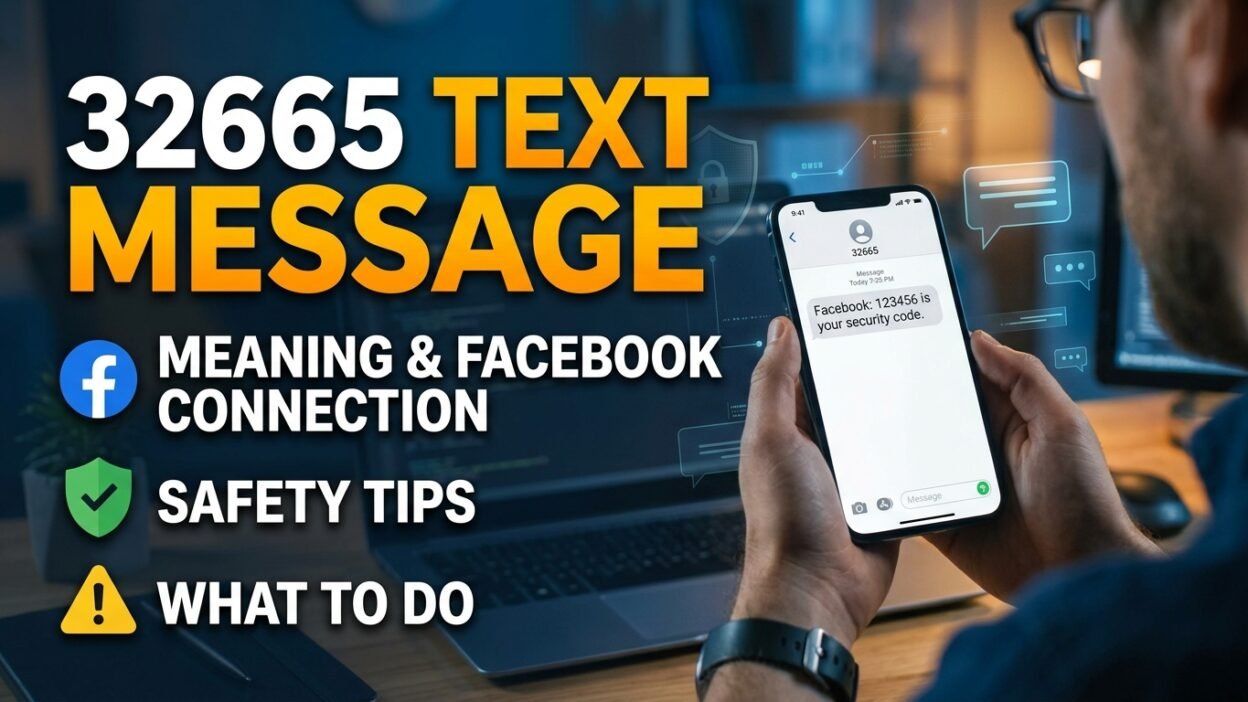
In the United States, 32665 is a short code associated with Facebook’s SMS messaging service. The number also spells “FBOOK” on a traditional phone keypad. Facebook has used this short code for account notifications and security-related messages.
However, the sender number alone doesn’t guarantee that every message is trustworthy. You might receive a legitimate security code, an unexpected login notification, or a suspicious message that imitates a familiar service.
The important thing is to understand what the message says and why you received it. If you didn’t request a verification code, you should take sensible precautions without immediately assuming someone has hacked your account.
This guide explains what 32665 means, why these messages arrive, how to recognize possible scams, how to stop unwanted texts, and what steps to take if you accidentally share a security code.
📱 What Is a 32665 Text Message?
A 32665 text message is an SMS sent from a five-digit short code associated with Facebook messaging services, particularly in the United States. Unlike an ordinary phone number, a short code allows a business or digital service to communicate with users through text messages.
Facebook has historically used 32665 for several SMS functions, including account notifications and verification-related messages. The number is easy to recognize because its digits correspond to the letters in “FBOOK” on a traditional telephone keypad.
You might encounter this sender when:
- You’re signing in to Facebook and need a confirmation code.
- You’re resetting your Facebook password.
- You’re receiving account-related text notifications.
- Someone has entered your phone number during a login or recovery attempt.
- Someone has entered your number by mistake.
Is 32665 a real number? Yes, it has a legitimate connection to Facebook’s SMS service. Nevertheless, you should evaluate the message itself instead of trusting the sender number automatically.
Short codes, branding, and familiar wording aren’t enough to establish that a particular message is safe. Your next step should depend on the message’s content and whether you initiated the action it describes.
🔎 Why Did I Receive a Text From 32665?
There isn’t just one explanation for receiving a message from this number. Fortunately, the wording of the text and your recent account activity can help you understand what happened.
1. You requested a Facebook verification code
If you recently tried to log in, Facebook may send a temporary code to verify your identity. You might also receive one while completing a password reset or another security-related action.
For example, a message could say:
Your Facebook confirmation code is 123456. Don’t share it with anyone.
The number above is an illustrative example, not a real verification code.
If you requested the code yourself, open the Facebook app or website you were already using and enter it there. Never give the code to another person, even if they claim to work for Facebook.
2. Someone entered your phone number
Perhaps you weren’t trying to log in at all. In that case, another person might have entered your phone number on a Facebook login, registration, or password-recovery screen.
Sometimes this happens because of a typing mistake. In other situations, someone may be attempting to access an account or use your number during an account-related process.
Receiving one unexpected code doesn’t prove that anyone has accessed your account. However, repeated codes you didn’t request deserve attention.
3. Facebook SMS notifications are enabled
Facebook has historically offered SMS notifications for certain account activities. If you enabled these features, you may receive messages related to your account without opening the app.
The precise notifications available can vary by region, carrier, and service configuration. Therefore, don’t assume every message from 32665 has the same purpose.
4. Someone is trying to trick you
A scammer might contact you shortly after a genuine verification code arrives. They could pretend to be a buyer, a friend, or a support representative and ask you to share the number.
This is particularly dangerous because the original text may be legitimate even though the subsequent request is fraudulent. Keep your code private and handle account issues through Facebook directly.
🛡️ Is a 32665 Text Message Legitimate or a Scam?
A message from 32665 can be legitimate, but that doesn’t mean you should trust every text associated with this sender.
The safest approach is to examine three things: whether you requested the message, what the text asks you to do, and whether you can verify the activity through your Facebook account.
Use this comparison to identify common warning signs.
Message type
What it may indicate
Recommended action
Verification code you requested
A normal security check
Enter it only on the Facebook screen you opened
Unexpected verification code
Someone entered your number or initiated an account action
Don’t share the code; review account security
Password-reset notification
A recovery attempt may be underway
Check your account directly
Message demanding your password
A serious warning sign
Don’t respond or provide credentials
Suspicious link threatening account closure
Possible phishing attempt
Avoid the link and verify independently
A person asking you to forward a code
Possible account takeover attempt
Refuse and report the request
These examples describe common patterns, not a guarantee that a particular message is genuine or fraudulent.
Signs that a message deserves extra caution
Be especially careful if a text:
- Threatens to delete your account unless you act immediately.
- Requests your password, recovery code, or other sensitive information.
- Directs you to an unfamiliar website to unlock your account.
- Asks you to pay a fee to restore access.
- Tells you to forward a verification code to a friend or stranger.
For example, a message claiming that your account will be permanently suspended in ten minutes unless you click a link should make you pause. Instead of following the instructions, open Facebook independently and check for any genuine account alerts.
One important distinction is worth remembering: 32665 is associated with a legitimate service, but the number displayed on your phone isn’t sufficient proof that a particular message is safe. Reports about suspicious texts associated with this short code reinforce the need to assess the content carefully.
🔐 What Should You Do If You Receive an Unexpected Code?
An unexpected code can feel alarming, but you don’t need to panic. Receiving the message alone doesn’t establish that someone knows your password or has entered your account.
Follow these steps to protect yourself.
Step 1: Don’t share the code
Keep the code private, even if someone tells you they sent it by accident. A person who asks for the number may be trying to complete an account action using your phone number.
Never send the code through Messenger, WhatsApp, email, or another text message.
Step 2: Open Facebook directly
Use the official Facebook app or type the website address into your browser yourself. Don’t follow an unexpected link simply because the message appears to come from a familiar sender.
Next, check your account notifications and security settings for unfamiliar activity.
Step 3: Review your active sessions
Look for devices, browsers, or login sessions you don’t recognize. Facebook’s account-security settings provide options for reviewing where you’re logged in and signing out of unfamiliar sessions.
If you find suspicious activity, remove the unfamiliar session and continue securing your account.
Step 4: Change your password if necessary
If you notice an unfamiliar login, suspect that someone knows your password, or have shared a verification code, change your password using Facebook’s official app or website.
Choose a strong password that you don’t use for other accounts. If you reuse the same password elsewhere, update those accounts too.
Step 5: Strengthen your account security
Enable two-factor authentication if you haven’t already. Where available, consider using an authenticator app or another supported security method rather than relying exclusively on text messages.
Finally, review your recovery email address and phone number. Make sure they belong to you and that you can access them.
These steps are especially useful when the message arrives repeatedly or alongside other unexpected account notifications.
🚨 Can Someone Hack Your Facebook Account With a 32665 Code?
A person generally needs more than simply receiving a text message to complete an account takeover. However, a verification code can help someone authenticate an action if they have already initiated the relevant login or recovery process.
That’s why scammers try to persuade people to reveal their codes.
Imagine this situation:
You receive a confirmation code from 32665. Shortly afterward, someone contacts you through Facebook Marketplace and claims they need the code to verify that you’re a genuine seller.
The explanation sounds plausible, particularly if you’re trying to sell something. Nevertheless, the person may have initiated an account action using your phone number and could be attempting to use your code to complete it.
Never provide a Facebook verification code to a Marketplace buyer, seller, friend, or supposed support agent. Enter it only into the appropriate official account screen when you’ve initiated the action yourself.
If you already shared a code, act promptly:
- Open Facebook directly and check whether you can still access your account.
- Change your password if you suspect unauthorized access.
- Review active sessions and sign out unfamiliar devices.
- Check your recovery information and security settings.
- Follow Facebook’s official account-recovery process if you lose access.
If you also shared your password, secure any other account where you reused it. Taking these steps quickly can help limit further damage.
🔗 Should You Click Links in a 32665 Text Message?
You should treat unexpected links cautiously, especially when a message asks you to verify your identity, restore an account, or prevent an alleged suspension.
A familiar sender name or number doesn’t make every link trustworthy. Scammers can imitate the language of legitimate services, and sender information may not always establish who actually sent a message.
Here’s a safer way to handle different situations:
- You requested a code: Use the code on the official Facebook screen where you initiated the request.
- The message contains an unfamiliar link: Don’t open it. Visit Facebook independently instead.
- The text threatens immediate account deletion: Check your account directly rather than reacting to the threat.
- You already clicked the link: Close the page and avoid entering personal information.
- You entered your password on a suspicious page: Change it through the official service and review your security settings.
If you downloaded an unfamiliar file or installed an application after following a suspicious message, take additional steps to secure your device.
Importantly, don’t judge a message solely by its grammar or appearance. Some scams contain polished language, while genuine automated messages can look unusual. The context and requested action matter more than whether the text looks professional.
📵 How to Stop Receiving Text Messages From 32665
If you no longer want Facebook SMS notifications, you may be able to turn them off through the service’s available controls.
Historically, Facebook has supported SMS commands such as STOP and START for managing text notifications. Availability can depend on the carrier, country, and current service configuration.
Option 1: Send STOP
Where supported, replying STOP to 32665 can unsubscribe your phone number from Facebook SMS notifications.
Before using this option, make sure you’re dealing with the expected messaging service. If you have doubts about a suspicious message, don’t follow instructions or links contained in it.
Also, turning off SMS notifications may affect security messages delivered through that channel. If you rely on text messages for account verification, configure another supported security method first.
Option 2: Change your Facebook notification settings
You can also review notification settings in Facebook.
- Open the Facebook app or official website.
- Go to your account settings.
- Find the Notifications section.
- Look for SMS or text-message notification options, if available.
- Disable the notifications you no longer want.
The exact menu names may differ depending on your device, app version, and account configuration.
Option 3: Contact your mobile carrier
If unwanted texts continue after you’ve adjusted your settings, ask your carrier whether it can help with unwanted SMS messages or short-code messaging.
However, blocking the sender may also prevent legitimate security messages from reaching you. Consider the consequences before blocking a short code you may still need.
🌎 Does 32665 Work in Every Country?
No. Short-code services aren’t necessarily identical worldwide.
Facebook has used 32665 for SMS features in the United States, but the short codes and functions available in other regions can differ. Mobile carriers also determine which short codes their networks support.
For example, someone in the United States might receive a Facebook verification code from 32665, while a user elsewhere could encounter a different sender number or may not have access to the same SMS features.
If you live outside the United States, keep these points in mind:
- A different sender number doesn’t automatically indicate a scam.
- A familiar short code doesn’t guarantee that a message is safe.
- Your carrier may have different rules for international or premium messaging.
- Facebook’s available account-verification methods may vary by region.
If you receive an unfamiliar message, open Facebook directly and check your account activity. You can also consult Facebook’s official Help Center for information relevant to your region.
💰 Can a 32665 Text Message Cost Money?
It depends on your mobile plan, carrier, and location.
Standard messaging charges may apply to SMS services, particularly if your plan charges for sending or receiving certain types of messages. The terms of your mobile plan determine the actual cost.
Before replying to a short code, check your carrier’s messaging policy if you’re concerned about charges. Don’t assume that every short-code message is free simply because it relates to a familiar company.
Likewise, be cautious if someone demands payment to verify your Facebook account, recover your profile, or unlock a security feature. Don’t pay an unfamiliar person or use a payment link from a suspicious text.
For billing questions, contact your mobile carrier through its official website or customer-service number.
⚠️ Common Mistakes to Avoid When Handling 32665 Messages
Even careful users can make mistakes when they receive an unexpected security notification. A few simple precautions can prevent unnecessary account risks.
Assuming every message is genuine: Although 32665 has a legitimate connection to Facebook SMS, you should still evaluate the message’s content and context.
Sharing a code to help someone: A person may claim to be a buyer, a friend, or a support representative. Nevertheless, nobody else needs you to forward a private verification code to prove your identity.
Changing your password without checking the situation: An unexpected code doesn’t automatically mean your account has been compromised. Review your account activity and take additional steps if you see suspicious signs.
Clicking links because the message looks urgent: Scammers often use time limits and threats to pressure recipients. Open the official service independently instead.
Ignoring repeated verification attempts: One unexpected code can result from a typo. Repeated codes may indicate ongoing attempts to use your number, so review your account security.
Blocking all security messages without an alternative: If you depend on SMS verification, disabling the service could make account recovery more difficult. Set up another supported method first.
Ultimately, a measured response is more useful than either trusting every message or assuming every unexpected notification means you’ve been hacked.
🧭 What If You Don’t Have a Facebook Account?
Receiving a text from 32665 can be confusing if you don’t use Facebook.
One possible explanation is that someone entered your phone number by mistake. Another is that someone is attempting to register an account or initiate a recovery process using your number.
The message alone doesn’t prove that a Facebook account has been created in your name.
Here’s what you can do:
- Don’t share any verification code you receive.
- Avoid clicking unfamiliar links in the text.
- Don’t enter personal details on a website linked from an unexpected message.
- If the messages continue, consider contacting Facebook through its official Help Center.
- Ask your mobile carrier about filtering unwanted messages if necessary.
If someone contacts you asking for a code, don’t cooperate. You don’t need to help a stranger complete an account-verification process associated with your phone number.
Additionally, avoid replying to suspicious messages with personal details or lengthy explanations. Keeping your response minimal—or not responding at all—is usually the safer choice.
❓ Frequently Asked Questions About 32665 Text Messages
1. What does 32665 mean in a text message?
32665 is a five-digit SMS short code associated with Facebook’s text messaging service, particularly in the United States. It has been used for account notifications and verification-related messages. The exact purpose depends on the content of the text and the action that triggered it.
2. Is 32665 a legitimate Facebook number?
Yes, 32665 has a legitimate association with Facebook SMS services. However, that doesn’t guarantee that every message displaying this sender is genuine. Check the message carefully, avoid suspicious links, and verify account activity through Facebook directly.
3. Why did I receive a 32665 verification code when I didn’t request one?
Someone may have entered your phone number by mistake or initiated a login, registration, or password-recovery process using your number. Keep the code private and review your account security if the messages continue or you notice unfamiliar activity.
4. Can I ignore a text from 32665?
If you didn’t request a verification code, you can generally leave it unused. Don’t share it with anyone or follow unfamiliar links. However, if you notice repeated codes, unfamiliar account sessions, or other suspicious activity, take additional steps to secure your account.
5. How do I stop texts from 32665?
Where supported, you can reply STOP to manage Facebook SMS notifications. Alternatively, review your Facebook notification settings or contact your mobile carrier about unwanted messages. Remember that disabling SMS notifications may affect security messages delivered through that channel.
6. Can someone steal my account with a 32665 code?
A verification code can help someone complete an account action if they have initiated the relevant process. If you give that code to a scammer, you may enable unauthorized access. Never share verification codes, and secure your account immediately if you’ve disclosed one.
7. Does receiving a 32665 text mean someone knows my password?
Not necessarily. Someone may have entered your phone number without knowing your password. However, you should investigate if you receive repeated codes, unexpected password-reset notices, or alerts about unfamiliar logins.
8. What should I do if I clicked a suspicious link in a 32665 message?
Close the page and don’t enter additional information. If you entered your password, change it through Facebook’s official app or website. If you shared a verification code, review active sessions, sign out unfamiliar devices, and follow the official recovery process if needed.
✅ Final Thoughts
A 32665 text message is often associated with Facebook’s SMS service, but the sender number alone cannot tell you whether a particular message is safe. The most important thing is to understand why the message arrived and whether you initiated the account activity it describes. If you receive an unexpected verification code, keep it private and check your account directly. Avoid suspicious links, refuse requests to forward security codes, and strengthen your account protection when necessary. By staying cautious and verifying information independently, you can handle these messages confidently without unnecessary worry.