If you have received a 36923 text message and are wondering who sent it, why it appeared on your phone, or whether it is safe, you are not alone. Unexpected messages from five-digit or other short numbers can be confusing, especially when they arrive without a clear explanation. Before replying, clicking a link, or sharing personal information, it is important to understand what the message actually says.
The number 36923 may appear as a sender ID or short code associated with an automated text message. However, the number alone is not enough to confirm which company sent it, what service it relates to, or whether the message is legitimate. Its purpose may depend on the mobile carrier, the service involved, and the country where you received it.
In this guide, you will learn how to investigate a 36923 text message, recognize possible verification codes and service alerts, identify warning signs of text-message scams, and decide what to do next. You will also find practical steps for protecting your phone number, accounts, and personal information. The goal is to help you make a safe, informed decision without assuming that every unfamiliar text is either legitimate or fraudulent.
📱 What Is the 36923 Text Message Number?
The number 36923 is listed in a third-party short-code directory as Message Media, a business messaging service. This provides a useful lead when identifying the sender, but it does not independently prove that every text arriving from 36923 is genuine or that Message Media directly sent a particular message.
Businesses use SMS messaging platforms to send notifications, reminders, authentication codes, and other communications to customers. A messaging provider may transmit a text on behalf of another organization, so the company named in the message may be different from the technology provider.
Here are the key points to understand:
- 📩 Possible sender connection: Public short-code directories associate 36923 with Message Media.
- 🏢 Business messaging: Messaging platforms can deliver texts for different organizations.
- 🔐 Verification matters: The message’s content and the service it claims to represent are important.
- ⚠️ No automatic safety guarantee: A familiar-looking sender number does not prove that a link or request is safe.
If you received a message from 36923, check whether it mentions a company, an account, an order, or a service you recently used. That information can help you determine the next step.
🔍 Why Did I Receive a Text Message From 36923?
There are several possible reasons why this number appeared on your phone. The exact explanation depends on the message content and your recent activities.
1. Account or service notifications
Some businesses use messaging providers to send updates about an account or service. These messages may confirm an action, provide a reminder, or notify you of a change.
For example, you might receive a message about a service you recently registered for. However, you should verify the organization independently before trusting the message.
2. Verification codes and login alerts
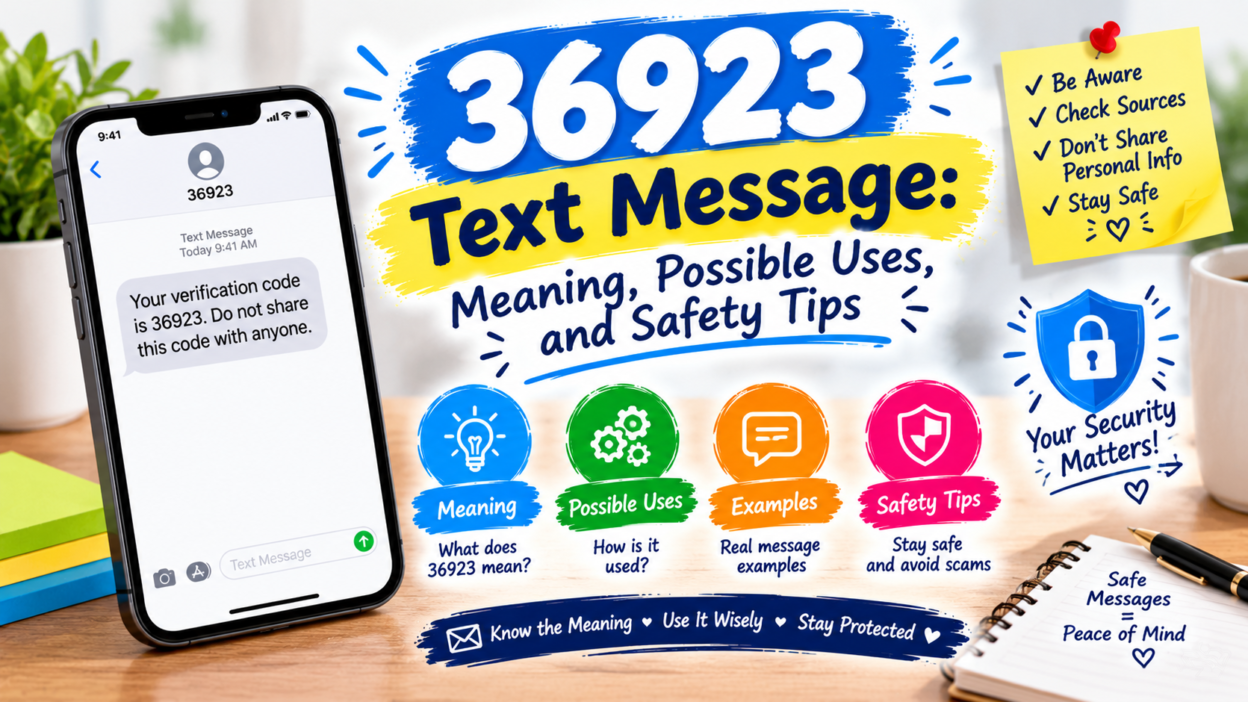
Some automated messages contain one-time passwords (OTPs) or security codes. These are used to verify a phone number, confirm a login, or authorize a particular action.
If you requested a code immediately before receiving the text, it may be related to that request. If you did not request it, do not share the code with anyone.
An unexpected verification code does not automatically mean your account has been compromised. Someone may have entered the wrong phone number, or an individual may be attempting to access an account associated with your number.
3. Appointment or transaction reminders
Organizations can use SMS platforms to deliver appointment reminders, transaction updates, or service notifications.
Consider whether you recently scheduled an appointment, submitted a form, made a purchase, or contacted customer support. If the message refers to an activity you recognize, verify it through the organization’s official website or app.
4. Marketing or promotional messages
Businesses may also send promotional offers, product announcements, or subscription updates through text messaging services.
If you recognize the company but no longer want its messages, check whether the text provides a legitimate opt-out instruction. Do not reply to a suspicious message simply to ask who sent it.
5. A mistaken or suspicious message
Sometimes, a text arrives because someone entered an incorrect phone number. In other cases, an unsolicited message may be designed to make you click a link, disclose personal information, or send money.
The sender number alone cannot distinguish between these situations. Review the message carefully before taking action.
🛡️ Is the 36923 Text Message Legit or a Scam?
A text from 36923 should not automatically be classified as either legitimate or fraudulent. The available directory information provides a possible association with Message Media, but the full message is needed to assess its purpose and risk.
Use the following checklist to evaluate the message.
Signs that may support legitimacy
- The message refers to a service you actually use.
- You recently requested the notification or verification code.
- The details match information in the company’s official app.
- The organization confirms the message through an independently verified support channel.
Warning signs that require caution
- The message threatens immediate account closure.
- It demands an unexpected payment or fee.
- It asks for your password, PIN, or verification code.
- It contains a suspicious or misspelled website address.
- It claims you have won a prize but must pay to receive it.
- It pressures you to act before you can verify the claim.
A professional tone, familiar company name, or short sender code is not sufficient proof of authenticity. Scammers can imitate legitimate organizations and use convincing language.
The safest approach is to verify the claim separately. Open the official app or type the known website address into your browser rather than following an unsolicited link.
🔐 What Should You Do If You Receive a 36923 Text Message?
If you are unsure why the message arrived, follow these practical steps.
Step 1: Read the message without interacting
Look at the entire text and identify what it asks you to do. Does it mention a login, purchase, appointment, payment, or account issue?
Do not click links, download attachments, or call unfamiliar numbers included in a suspicious message.
Step 2: Check whether you recognize the service
Think about your recent activity. You may have signed up for a service, requested a verification code, or provided your number to a business.
If the message refers to an unfamiliar transaction or account, do not assume it is yours. Verify the claim independently.
Step 3: Confirm the sender independently
Visit the organization’s official website or open its established mobile app. Look for account notifications, transaction records, or support information that can confirm the message.
If the text does not identify a company, contact your mobile carrier for guidance about the sender code.
Step 4: Protect your personal information
Never share passwords, banking PINs, recovery codes, or one-time verification codes in response to an unsolicited request.
A legitimate service may send you a verification code, but that does not mean you should disclose it to a caller or someone replying to your message.
Step 5: Block or report suspicious messages
If the message is clearly fraudulent or unwanted, use your phone’s spam-reporting and blocking features. You can also report it to your mobile carrier or the relevant national reporting authority.
Keep a screenshot if you may need to report the incident later.
🚨 Common Scams to Watch for in Messages From Short Codes
Although the sender number alone cannot establish a scam, understanding common SMS fraud tactics can help you avoid costly mistakes.
Fake account security alerts
A message might claim that your account has been locked or that suspicious activity requires immediate verification. It may then provide a link to a fake login page.
What to do: Open the official app or website yourself and review your account security. Never enter your credentials on a page reached through an unverified text.
Unexpected payment requests
Some fraudulent messages claim that you owe a fee, have an unpaid bill, or must pay to release a package.
What to do: Check your actual account balance or delivery status through the official service. Do not make payments through an unfamiliar link.
Prize and reward scams
You may receive a message claiming you have won a gift card, cash prize, or special reward. The sender might ask you to pay a processing fee or provide personal information.
What to do: Treat unexpected prizes with caution. Do not pay money to claim an unverified reward.
Verification-code theft
Someone may contact you after a verification code arrives and pretend to be a support representative. They may claim they need the code to confirm your identity.
What to do: Never disclose a one-time code to another person. If you did not initiate the login, review your account security and change your password if there is evidence of unauthorized access.
Fake customer support
A suspicious text may direct you to a phone number or messaging account controlled by someone impersonating a business.
What to do: Find the company’s support contact independently. Avoid using contact details supplied only in an unexpected message.
🔗 Should You Click a Link in a 36923 Text Message?
You should avoid clicking a link until you have verified the message and its destination.
Even if a short code has a legitimate business association, the sender information alone cannot confirm that a particular message or URL is trustworthy. Messages can imitate known brands, and links may lead to phishing websites.
Before opening a link, ask yourself:
- 🔎 Was I expecting this message?
- 🌐 Does the stated organization match the website address?
- 🔒 Can I confirm the notification through the official app?
- 💳 Is the link requesting payment or sensitive information?
- ⏰ Is the message pressuring me to act immediately?
Remember that HTTPS and a padlock icon indicate an encrypted connection, not that a website is legitimate.
When in doubt, do not use the link. Visit the organization’s official website independently or contact its verified support team.
📵 How to Block or Report Unwanted Messages From 36923
If the messages are unwanted, repetitive, or suspicious, you can take steps to reduce future interruptions.
On an iPhone
- Open the Messages app.
- Open the conversation from the sender.
- Tap the sender’s details or information icon.
- Look for the available blocking or reporting options.
The exact controls may vary by iOS version and message type. Reporting an unwanted message and blocking a sender are separate actions, and both may not be available in every conversation.
On an Android phone
- Open Google Messages or your phone’s default messaging app.
- Select the conversation.
- Open the conversation menu.
- Choose the available block or spam-reporting option.
Menu names vary between devices and messaging apps. If you cannot find the relevant control, consult your phone manufacturer’s support instructions.
Contact your mobile carrier
Your carrier may be able to explain how to report spam, block unwanted messages, or investigate repeated suspicious texts.
If the message appears to impersonate a business, you can also contact that business through its official support channel.
Important: Do not send sensitive information to an unfamiliar sender while trying to unsubscribe. Only use opt-out instructions when you have reasonable confidence that the message comes from a legitimate service.
🧾 How to Find Out Who Really Sent the 36923 Text Message
If your main question is who sent the text, use a structured verification process rather than relying on a number lookup alone.
First, examine the message itself. Look for the business name, the service mentioned, the reason for contacting you, and any transaction or account reference.
Second, check public short-code directories. The number 36923 appears in a directory associated with Message Media. This is a starting point, not definitive evidence about the specific message you received.
Third, verify through the claimed organization. If the text mentions a bank, retailer, delivery company, or online service, use the contact information published on its official website.
Finally, ask your carrier if the sender remains unclear. Your carrier may be able to provide information about the message or advise you on reporting it, although it may not disclose the underlying customer or sender details.
Avoid websites that promise to reveal a sender’s private identity in exchange for payment or sensitive personal information. A lookup service may provide clues, but it cannot always establish who initiated a particular message.
🌎 Does the Meaning of 36923 Depend on Your Country?
Yes. Short-code systems, registration rules, and messaging practices vary by country and mobile network.
A five-digit number may be used by a business messaging provider in one market but have a different status or may not work in another. A directory entry associated with a US short code does not automatically establish how the number is handled by a Pakistani, British, Canadian, or other mobile carrier.
If you received the message outside the United States, consider the following:
- 🌍 Check the country and mobile network associated with your SIM.
- 🏢 Identify the organization named in the message, if any.
- 📱 Review your carrier’s official guidance on suspicious texts.
- 🔐 Verify account alerts directly through the relevant service.
- 🚫 Do not assume that a sender code is legitimate simply because it appears in an online directory.
Your country and the full text of the message may help narrow down the explanation. However, neither detail should replace independent verification when the message requests money or sensitive information.
🧰 What If You Already Clicked a Link or Shared Information?
If you interacted with a suspicious message, take action based on what happened. Clicking a link does not necessarily mean your device or account has been compromised, but entering information or installing software can increase the risk.
- If you only opened the link: Close the page. Do not enter information or download anything. If you downloaded a file, installed an app, or granted permissions, investigate those actions promptly.
- If you entered a password: Visit the real service independently, change the affected password, and secure any other accounts using the same password. Enable multifactor authentication when available.
- If you shared a verification code: Open the relevant account through its official app or website, review recent activity, and secure the account immediately.
- If you shared banking details or sent money: Contact your bank or payment provider using its official number. Ask about blocking transactions, securing the account, and disputing unauthorized payments.
- If you installed an unfamiliar app: Remove it if appropriate, review its permissions, and use your device’s built-in security tools. If you suspect a serious compromise, seek help from a trusted technical professional.
Keep screenshots and relevant transaction details if you need to report the incident. Acting quickly can reduce the potential damage.
❓ Frequently Asked Questions About the 36923 Text Message
1. What is the 36923 text message?
36923 is listed in a public short-code directory as being associated with Message Media, a business messaging service. The exact purpose of a particular text cannot be confirmed from the number alone.
2. Is 36923 a legitimate short code?
A directory associates 36923 with Message Media, but that association does not prove that every message from the number is authentic. Verify the message’s content and claimed sender independently before acting.
3. Is a text from 36923 a scam?
Not necessarily. It could be a legitimate business notification or an unexpected message requiring further investigation. Treat requests for passwords, verification codes, or unusual payments as warning signs.
4. Why did I receive a message from 36923 without requesting one?
Possible explanations include a mistaken phone number, a service notification, a message associated with an account, or an unsolicited promotional text. If it contains an unexpected login code, do not share it and check your account security.
5. Should I reply STOP to 36923?
Only consider replying STOP if you have verified that the message is from a legitimate messaging program and the opt-out instruction is appropriate. For suspicious messages, avoid replying and use your phone’s spam-reporting features instead.
6. Can 36923 access my phone or steal my information?
A sender code by itself does not establish that your phone has been compromised. However, a fraudulent message may attempt to trick you into revealing information, visiting a phishing website, or installing harmful software. Avoid interacting with suspicious links or attachments.
7. How can I stop receiving messages from 36923?
You can block the sender or report the message as spam using your phone’s messaging app, depending on the available features. If the messages continue, contact your carrier for additional guidance.
8. What should I do if the message asks for a verification code?
Do not share the code with anyone. If you did not request it, check the security of the relevant account through its official app or website. If you suspect someone has accessed your account, change your password and review recent activity.
✅ Conclusion
The 36923 text message number is associated with Message Media in a public short-code directory, but that information alone cannot confirm the identity of the sender or the legitimacy of an individual message. Check the message’s content, verify any claimed business through its official website or app, and never share passwords, payment details, or verification codes in response to an unexpected request. If the text seems suspicious, avoid its links, block or report it, and contact your mobile carrier when necessary. A few careful checks can help you distinguish an ordinary notification from a potential scam and protect your personal information.