If you received a 65821 text message and don’t recognize the number, you’re probably wondering who sent it and whether it’s safe to respond. Short-code messages can come from businesses, online services, automated notification systems, or other organizations. However, identifying the sender requires more than looking at the number displayed on your phone.
The number 65821 appears in a format that resembles an SMS short code. Nevertheless, its exact purpose cannot be confirmed from the number alone. Its meaning may depend on the service involved, your country, the message’s wording, and whether you’ve recently signed up for an account or requested a verification code.
In this guide, you’ll learn how to investigate an unfamiliar message, recognize possible warning signs, and decide what to do next. We’ll also explain how to handle verification codes, suspicious links, unexpected account alerts, and messages that ask for personal information.
The goal is simple: help you understand the message without making assumptions about its sender or putting your privacy at risk.
🔎 What Is the 65821 Text Message?
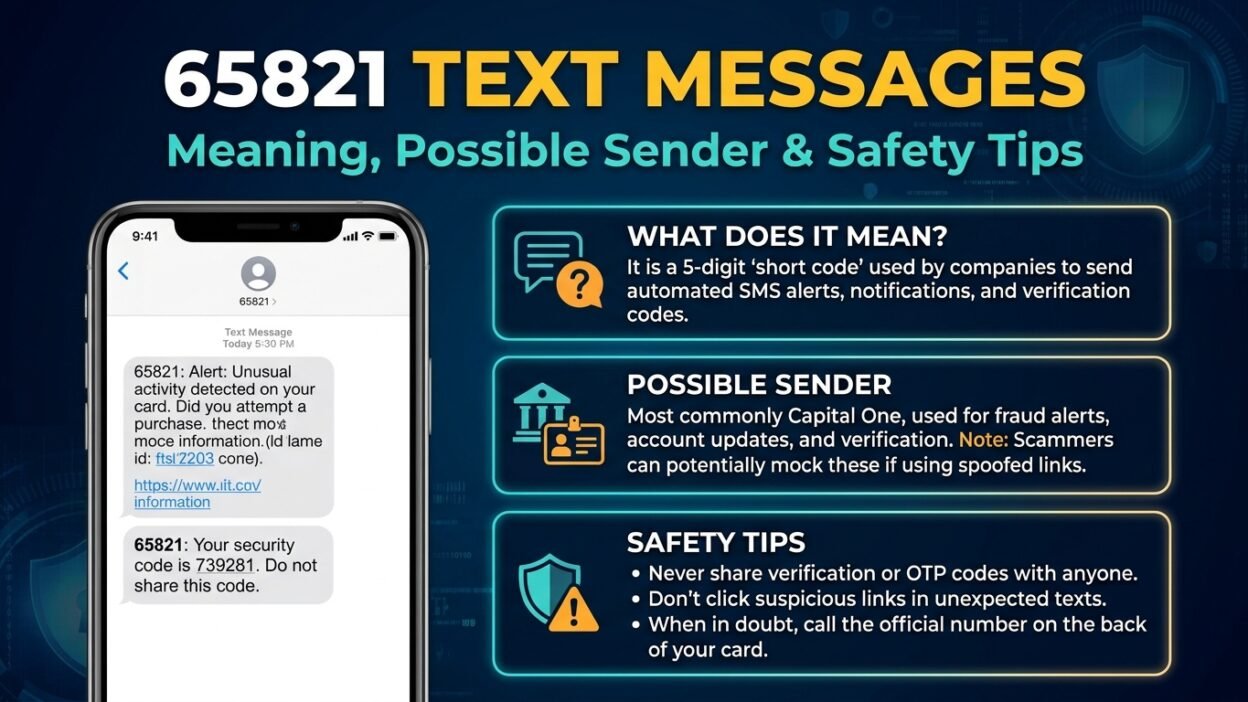
The 65821 text message is associated with an SMS short code used for automated communications. Several short-code directories identify it with Okta, a company that provides identity management and authentication services. A financial institution’s published terms also list 65821 among its SMS short codes.
A short code is a five- or six-digit number that organizations use to send text messages. Instead of displaying a traditional mobile number, the message appears under a shorter sender ID.
However, there’s an important distinction: identifying a number associated with a service doesn’t prove that every message received from it concerns that service. Third-party directories can contain outdated or conflicting information, and short-code use can vary by messaging program.
Here’s what you should understand before drawing conclusions:
- Possible authentication message: It may relate to a login, identity check, or account verification process.
- Possible account notification: It could be associated with a service that sends automated account-related updates.
- Unverified message: If the content doesn’t match an action you took, verify it independently before responding.
For that reason, the wording of your message and your recent account activity are more useful than the number alone.
📱 Who Sends Messages From 65821?
Available online listings associate 65821 with Okta and describe it as a short code used for authentication-related messages.
However, those listings don’t establish the identity or purpose of every individual text.
Okta helps organizations manage digital identities and verify users accessing protected applications. For example, an employee might use an authentication service to sign in to a workplace account, or a company might require an additional verification step before granting access.
Other published records also list 65821 in connection with SMS communications, including financial-service terms. This illustrates why you shouldn’t assume the same message purpose applies to every recipient.
To identify your specific sender, check the following:
- Read the entire text, including any company name or service reference.
- Think about whether you recently signed in to a work account or another online service.
- Check the relevant service’s official website or app.
- Compare the message with the company’s published security or messaging information.
If you cannot establish a connection, leave the message alone until you can verify it.
🔐 Why Did You Receive a 65821 Verification Code?
One possible reason is that an online service triggered a verification process. Authentication systems sometimes send one-time passcodes (OTPs) to confirm that someone attempting to sign in has access to a registered phone number.
For example, you might receive a code after entering your username and password on a workplace login page. Similarly, a service could request additional verification when you reset a password or access a protected application.
Nevertheless, an unexpected verification code doesn’t automatically mean your account has been hacked. There are several possible explanations.
You recently tried to sign in
The text may be a normal security step triggered by your own login attempt.
Someone entered the wrong phone number
Another person may have mistyped their number while registering or signing in.
Someone attempted to access an account
If a stranger has your login details, they may trigger a verification message while trying to sign in.
The message could be misleading
A suspicious text may imitate a legitimate service to persuade you to reveal information or visit a fraudulent website.
The safest response depends on which situation applies. If you initiated the login, use the code only on the official service’s login page. Otherwise, don’t share it with anyone.
🛡️ Is the 65821 Text Message Legitimate or a Scam?
The short code’s association with a legitimate service is useful information, but it doesn’t guarantee that a particular message is genuine. You must evaluate the content and the circumstances in which it arrived.
A genuine authentication message generally relates to a specific sign-in or verification action. A suspicious message may instead pressure you to disclose sensitive information, click an unfamiliar link, or act immediately to prevent a supposed account closure.
Compare these common signs:
Message detail
What it may indicate
A code arrives after you request one
Consistent with a normal verification process
A code arrives unexpectedly
A mistyped number or unrequested login attempt
A text requests your password
A serious warning sign
A message threatens immediate account closure
Potential pressure tactic
A link leads to an unfamiliar website
Requires independent verification
A message names a service you don’t use
The sender or purpose remains uncertain
Importantly, even a professional-looking message can be fraudulent. Likewise, an unexpected message can have an innocent explanation.
Therefore, don’t make your decision based solely on the sender ID, message formatting, or whether the text includes a verification code.
⚠️ What Should You Do If You Didn’t Request the Message?
If you receive a 65821 text message without attempting to sign in anywhere, you don’t need to panic. However, it’s worth taking a few sensible precautions.
1. Don’t share the verification code. Never give an unsolicited code to a caller, stranger, or person claiming to be technical support. A legitimate support representative shouldn’t need you to disclose a private authentication code.
2. Avoid clicking unexpected links. If the message asks you to secure an account, open the official app or type the company’s known website address into your browser instead.
3. Check your account independently. If you recognize the service, review recent login activity and security notifications. Look for unfamiliar devices or sign-in attempts.
4. Update your password if there is evidence of risk. If you discover an unfamiliar login or suspect that someone knows your password, change it through the official website. Choose a unique password that you don’t use elsewhere.
5. Enable stronger account protection. Where available, use a passkey or an authenticator app rather than relying exclusively on text-message codes.
If you don’t recognize the service and the message contains no credible indication of a compromised account, you can generally leave it unanswered. An isolated, unexpected code does not prove that someone has gained access to your account.
💬 Should You Reply STOP or HELP to 65821?
Some SMS programs support standard text commands such as STOP and HELP. These commands can let recipients unsubscribe from messages or request information about a messaging service. A short-code directory lists these options for 65821, but you should still confirm the instructions for the specific program involved.
Here’s how to approach the common commands:
- STOP: Use this when you want to unsubscribe from a recognized messaging program and have verified that the instruction applies.
- HELP: This may provide information about the service, its terms, or its support options.
- No response: If the message looks suspicious or you don’t recognize the sender, avoid replying until you have verified it.
Keep in mind that texting STOP may not resolve an account-security issue. If the message concerns a login you didn’t initiate, focus on securing the associated account rather than simply unsubscribing.
Also, don’t send personal information in response to an unfamiliar short code. If you aren’t sure whether the service is legitimate, contact the organization through its official support channel.
🧭 How to Identify the Exact Source of 65821
Finding the actual source of an unfamiliar text requires a little investigation. Third-party lookup websites can provide useful clues, but their records aren’t always consistent or current.
Use this process to narrow down the possibilities.
- Search your existing messages. Look for earlier texts from the same sender. A previous notification may identify the service or explain why the latest code arrived.
- Review your recent online activity. Consider whether you logged in to a workplace portal, registered for an account, or changed a security setting.
- Check official documentation. Search the relevant company’s own help center, security pages, or SMS terms for the number and its purpose.
- Contact official support. If the message remains unexplained, ask the service whether it sent the notification. Use contact information from its official website.
- Check your mobile carrier if necessary. Your carrier may help investigate unwanted messages or explain available spam-reporting options.
For example, if you recently signed in to a work portal that uses Okta, an authentication-related message could fit your activity. However, you should confirm the connection through your organization’s normal login process instead of trusting an unsolicited text.
This approach is more reliable than assuming a number has one permanent meaning for every recipient.
🏢 Could 65821 Be Related to Your Workplace?
Yes, a workplace authentication process is one possibility worth checking if you use an employer-managed account.
Organizations often protect email, internal applications, payroll portals, and other business systems with identity verification. Depending on the setup, an employee may receive a one-time code while signing in or completing an additional security check.
For instance, imagine you’re logging in to a company dashboard from a new laptop. The service asks for a verification code, and a text arrives from 65821. If the timing matches and your employer confirms that the service uses the number, the message may be legitimate.
On the other hand, if you receive the same type of text while you’re not signing in, don’t assume that a colleague or your IT department requested it.
Instead:
- Open your workplace portal through a known bookmark.
- Review any security notifications available in your account.
- Contact your IT team using your organization’s established communication channel.
- Never forward a private login code to someone who asks for it unexpectedly.
This is especially important for work accounts because a compromised login may expose internal documents, email, or company systems.
📵 Can You Block Messages From 65821?
You can often block or filter unwanted messages through your phone’s messaging app or your mobile carrier. The precise options depend on your device, operating system, and network.
Before blocking the number, consider whether it may be connected to an account you still use. Blocking authentication texts could prevent you from receiving future login codes or security alerts.
If you decide to block it, these general steps may help:
- Open your messaging app.
- Select the conversation from 65821.
- Open the conversation details or menu.
- Look for a block, report, or spam option.
- Follow the instructions shown on your device.
The wording varies between Android phones, iPhones, and messaging applications. Your carrier may also offer separate spam-filtering tools.
If the message is unwanted marketing from a service you recognize, an applicable unsubscribe command may be more appropriate than blocking all communications. However, if the text appears fraudulent, don’t follow instructions or click links simply to stop receiving it.
🧠 Common Mistakes to Avoid With Short-Code Messages
Unfamiliar messages often create confusion because people try to identify the sender before checking the actual content. Avoid these common mistakes to make a safer decision.
Assuming a short code guarantees safety. A recognizable sender ID doesn’t prove that every message is trustworthy. Evaluate the wording, links, and circumstances as well.
Sharing a code to prove your identity. A person who contacts you and asks for a verification code may be trying to access your account. Keep authentication codes private.
Clicking a link to investigate the sender. A message that claims to contain account-security information may direct you to a fake login page. Verify through the official service instead.
Changing every password after one unexpected text. An unsolicited code alone doesn’t establish that your accounts have been compromised. Check for additional warning signs and respond proportionately.
Trusting outdated lookup results. Online directories may disagree about the owner or purpose of a short code. Look for confirmation from the organization itself.
The best approach combines caution with verification. You don’t need to assume every unfamiliar message is dangerous, but you shouldn’t treat it as trustworthy without evidence.
❓ Frequently Asked Questions About the 65821 Text Message
1. What company uses the 65821 text message number?
Online short-code directories associate 65821 with Okta, and other published records list it among SMS codes used by financial services. However, these listings don’t establish the sender of every individual message. Confirm the connection through the official service before trusting the text.
2. Is 65821 a scam number?
The number alone doesn’t establish whether a message is fraudulent. It appears in directories associated with legitimate messaging services, but you should evaluate each text individually. Be cautious if it requests passwords, sensitive personal information, or payment through an unfamiliar link.
3. Why did I receive a 65821 verification code without requesting one?
Someone may have entered your phone number accidentally, or someone may have initiated a login attempt involving an account associated with your number. Don’t share the code. If you recognize the service, check your account security through its official app or website.
4. Should I ignore an unexpected message from 65821?
If you didn’t request a code and the message doesn’t require any action, you can generally leave it unanswered. However, if you notice unfamiliar account activity or receive repeated unexpected codes, investigate the relevant account and strengthen its security.
5. Can I reply STOP to 65821?
Some messaging programs support STOP to unsubscribe. However, verify that the message belongs to a legitimate program and that the command applies before replying. If the text appears suspicious, avoid interacting with it and use your phone’s spam-reporting options instead.
6. Can someone hack my account using a 65821 text message?
Receiving a text doesn’t itself give someone access to your account. The greater risk arises if someone obtains your password, persuades you to reveal a verification code, or tricks you into entering credentials on a fraudulent website. Keep codes private and investigate unexpected login activity.
7. What if I accidentally shared my 65821 verification code?
Act quickly. Open the relevant service through its official website or app, change your password if appropriate, review recent sign-ins, and revoke unfamiliar sessions. If you can no longer access the account, contact the provider’s official support team. Also secure any other accounts that share the compromised password.
8. Does blocking 65821 protect my accounts?
Blocking the sender may reduce unwanted texts, but it doesn’t secure an account by itself. If you suspect unauthorized access, review your account activity, update compromised credentials, and enable stronger authentication. Blocking can also prevent legitimate security codes from reaching your phone.
✅ Final Thoughts on the 65821 Text Message
The 65821 text message is associated with short-code messaging services, including authentication-related communications listed by third-party directories. However, the number alone cannot confirm why you received a particular text or whether its contents are trustworthy.
If you recently requested a verification code, check that the message matches your activity before using it. Otherwise, keep the code private, avoid unfamiliar links, and verify any account-related claims through the official service. If you discover suspicious activity, secure the affected account promptly.
Most importantly, stay calm and investigate the evidence rather than assuming either a harmless mistake or a security breach. A careful response can help protect your accounts, personal information, and peace of mind.