Have you ever tried sending a text, only to see the frustrating message “message blocking is active” appear on your screen? It can feel confusing, especially when you need to reach someone quickly. Sometimes, we all experience unexpected technology problems that interrupt important conversations.
The good news is that this message usually has a simple explanation. In many cases, it isn’t a permanent issue. Instead, it points to a setting, account restriction, or network problem that can often be resolved in just a few steps. Throughout this guide, you’ll learn what message blocking is active means, why it happens, and how you can fix it with confidence.
📱 What Does Message Blocking Is Active Mean?
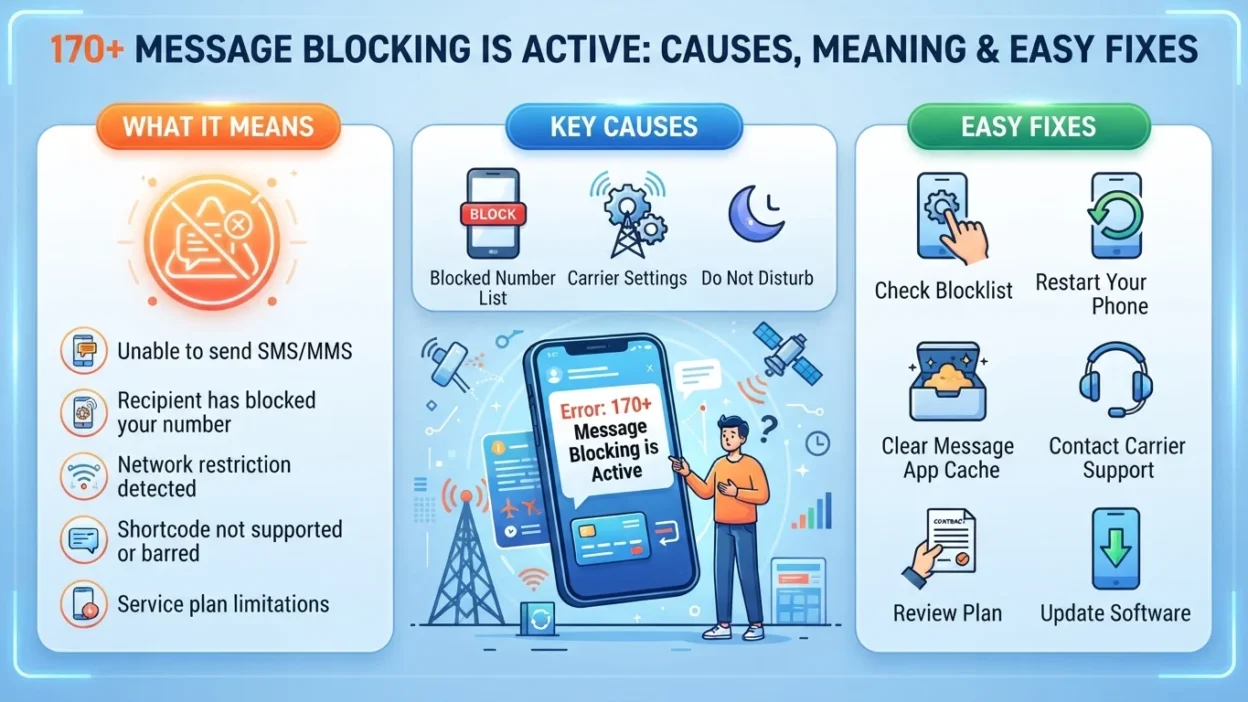
When you see message blocking is active, your mobile carrier or messaging service has prevented your text message from being delivered.
This doesn’t always mean someone blocked you. Instead, it usually means there is a restriction somewhere between your phone, your account, your carrier, or the recipient’s messaging settings.
Think of it like mailing a letter. If the post office finds an issue with the address or your account, the letter cannot continue its journey. Likewise, your message stops before reaching its destination.
🌟 Why Does Message Blocking Is Active Appear?
Several different situations can trigger this error. Understanding the cause makes solving it much easier.
✅ Your Mobile Plan Has Messaging Restrictions
Some prepaid plans don’t include SMS messaging.
Others may suspend texting if:
- 📵 Your balance is too low
- 💳 Your bill is overdue
- 📅 Your plan has expired
- 🚫 Messaging isn’t included
Because every carrier is different, checking your account status is always a smart first step.
✅ Premium Messages Are Disabled
Certain businesses send messages using premium or short-code numbers.
If premium messaging is turned off, your phone may display message blocking is active whenever you try to contact these services.
Examples include:
- Bank verification codes
- Delivery updates
- Appointment reminders
- Contest entries
- Donation services
✅ Blocked Contacts
Sometimes the issue is much simpler.
If you accidentally blocked someone’s number—or they blocked yours—messages may fail.
However, remember this important point:
Message blocking is active does not automatically prove someone blocked your phone number.
Many other technical reasons can produce the same message.
✅ Carrier Network Problems
Occasionally, the problem isn’t your phone at all.
Network outages can temporarily interrupt:
- SMS services
- MMS messaging
- Group texts
- Short-code delivery
Fortunately, these interruptions often disappear once the carrier resolves the issue.
✅ Incorrect Message Center Settings
Your phone stores a messaging service center number.
If this number becomes incorrect after:
- switching phones,
- restoring backups,
- changing SIM cards, or
- installing software updates,
SMS delivery may stop working.
Although most phones configure this automatically, rare situations require manual correction.
💬 Common Situations Where People See This Error
Real life shows that this message can appear in many unexpected moments.
For example:
📞 After Switching Carriers
Many people change providers to save money.
However, account migration occasionally leaves messaging services partially activated. As a result, texting may stop temporarily.
📱 After Buying a New Phone
New devices sometimes require:
- SIM activation
- Network registration
- Carrier updates
Until everything finishes correctly, outgoing messages may fail.
🌍 While Traveling
International travel introduces additional variables.
Roaming restrictions, unsupported networks, or regional carrier limitations may trigger message blocking is active.
Checking roaming settings before traveling can prevent unnecessary frustration.
🔄 Following a Software Update
Phone updates improve security and performance.
Even so, settings occasionally reset during installation. Consequently, messaging permissions or network configurations may need to be refreshed afterward.
🔍 How to Diagnose the Problem
Instead of guessing, work through the possibilities one at a time.
✔ Step 1: Check Signal Strength
Weak cellular coverage often prevents messages from leaving your phone.
Move outdoors or to another location before trying again.
✔ Step 2: Restart Your Phone
It sounds simple.
Nevertheless, restarting refreshes network connections and clears temporary software glitches surprisingly often.
✔ Step 3: Verify Your Mobile Account
Ask yourself:
- Is my bill paid?
- Do I have texting included?
- Has my prepaid balance expired?
- Is my SIM active?
If any answer raises concern, your carrier account deserves closer attention.
✔ Step 4: Test Another Contact
Send a message to someone else.
If only one person cannot receive texts, the issue may involve that specific number rather than your device.
Conversely, if nobody receives your messages, the problem is likely on your side.
✔ Step 5: Try Receiving Messages
Notice whether incoming texts still work.
This simple observation helps narrow down whether only outgoing messaging is affected.
⚠️ Common Misunderstandings
Many internet rumors make this error seem more mysterious than it really is.
Here are a few myths worth clearing up.
❌ Myth: Someone Definitely Blocked Me
Not necessarily.
Billing issues, network problems, disabled messaging, or account restrictions frequently create the exact same error.
❌ Myth: My Phone Is Broken
Most of the time, your hardware is perfectly fine.
Software settings and carrier services cause this message far more often than physical phone damage.
❌ Myth: Factory Reset Is the Only Fix
A factory reset should rarely be your first solution.
In fact, most users resolve the problem without erasing any data.
💡 Quick Troubleshooting Checklist
Before assuming the worst, review this simple checklist:
Working through these steps methodically often reveals the cause much faster than random troubleshooting.
✅ Restart your phone
✅ Confirm cellular service
✅ Check your account status
✅ Verify texting is included in your plan
✅ Test another contact
✅ Confirm your SIM card works correctly
✅ Look for carrier outages
✅ Update your phone software
✅ Review blocked contact settings
✅ Test both SMS and MMS
🔧 How to Fix Message Blocking Is Active
The right solution depends on the cause. Therefore, work through these fixes one by one instead of trying everything at once.
📲 Restart Your Device
A simple restart often refreshes your phone’s connection to your carrier.
Here’s what to do:
- 📱 Turn your phone completely off.
- ⏳ Wait about 30 seconds.
- 🔄 Turn it back on.
- ✉️ Try sending another text.
Although this sounds basic, it frequently resolves temporary network glitches.
📡 Check Your Cellular Signal
Text messages rely on your mobile network.
If your signal is weak:
- Move outdoors.
- Try another location.
- Turn Airplane Mode on for 20–30 seconds, then turn it off.
- Wait for your phone to reconnect.
Afterward, send a test message.
💳 Verify Your Mobile Account
One of the most common reasons for message blocking is active is an account issue.
Check whether:
- ✅ Your monthly bill is paid.
- ✅ Your prepaid balance is active.
- ✅ SMS messaging is included in your plan.
- ✅ Your account hasn’t been suspended.
If you recently changed plans, your messaging service may still be updating.
📨 Make Sure SMS Messaging Is Enabled
Some phones allow messaging services to be turned off accidentally.
Review your messaging settings and confirm that:
- SMS is enabled.
- MMS is enabled if you send photos.
- Chat features or RCS settings aren’t causing conflicts.
If needed, temporarily disable advanced chat features and test a regular text message.
🚫 Check Your Blocked Contacts
Sometimes the problem involves a blocked number.
Open your phone’s blocked contacts list and verify that the recipient isn’t there by mistake.
Likewise, if you suspect the other person blocked your number, remember that you usually can’t confirm this with certainty from your phone alone.
📶 Reseat Your SIM Card
A loose or improperly connected SIM card can interfere with messaging.
Try these steps:
- Turn off your phone.
- Remove the SIM card.
- Inspect it for dust or damage.
- Reinsert it carefully.
- Restart the device.
If the SIM appears damaged, contact your carrier about a replacement.
🍎 Fixing Message Blocking Is Active on iPhone
If you’re using an iPhone, these additional checks may help.
Update Carrier Settings
Carrier settings help your iPhone communicate with the network.
If an update is available, install it before testing messages again.
Verify iMessage Settings
Sometimes iMessage and SMS settings become unsynchronized.
Try:
- Turning iMessage off.
- Waiting one minute.
- Turning it back on.
- Sending a normal SMS.
This refresh often resolves messaging inconsistencies.
Check Date and Time
Incorrect date or time settings occasionally interfere with network services.
Enable automatic date and time if it’s currently set manually.
🤖 Fixing Message Blocking Is Active on Android
Android devices vary by manufacturer, but these steps work for most models.
Clear the Messages App Cache
A corrupted cache may cause unexpected messaging problems.
Go to:
Settings → Apps → Messages → Storage → Clear Cache
After clearing the cache, restart your phone.
Update Your Phone
Software updates frequently include network improvements.
Install any available updates, then test messaging again.
Reset Network Settings
If network settings become corrupted, resetting them can help.
Keep in mind that this usually removes saved Wi-Fi passwords and Bluetooth pairings, so you’ll need to reconnect afterward.
🌍 Carrier-Related Causes
Sometimes your phone is working perfectly. Instead, the restriction comes from your mobile provider.
Examples include:
- Temporary service outages
- Fraud protection restrictions
- Account verification requirements
- Porting delays after changing carriers
- Messaging feature activation delays
If you’ve completed the basic troubleshooting steps, contacting your carrier may be the fastest solution.
📩 Why Group Messages Sometimes Fail
Many people notice that individual texts work, but group messages don’t.
Possible reasons include:
- MMS is disabled.
- Mobile data is turned off.
- A participant has incompatible messaging settings.
- The group contains both Android and iPhone users, leading to compatibility issues.
Testing with a simple one-on-one SMS can help determine whether the issue is limited to group messaging.
📵 Premium Short Codes and Verification Messages
Banks, online services, and businesses often use short-code numbers for:
- 🔐 Security verification
- 📦 Delivery notifications
- 🏦 Banking alerts
- 🛍️ Promotional offers
If premium or short-code messaging is disabled on your account, these messages may fail to send or arrive.
Checking your carrier settings can often resolve this issue.
💡 Advanced Troubleshooting Tips
If the problem continues, try these additional steps:
- ✅ Send a plain text instead of a photo.
- ✅ Test with another SIM card, if available.
- ✅ Insert your SIM into another compatible phone to see whether messaging works.
- ✅ Remove any recently installed messaging apps that might interfere.
- ✅ Ensure your default messaging app is set correctly.
Each test helps narrow down whether the issue lies with the phone, the SIM, or the carrier.
🌟 Preventing Future Messaging Problems
Although some network issues are unavoidable, good habits can reduce the chances of seeing message blocking is active again.
Consider these tips:
- 📲 Keep your phone updated.
- 💳 Maintain an active mobile plan.
- 📡 Use reliable cellular coverage whenever possible.
- 🔄 Restart your phone occasionally.
- 🔐 Avoid changing important messaging settings unless necessary.
- 📱 Keep your carrier information up to date after switching devices.
These small steps can improve overall messaging reliability over time.
In the final part, we’ll cover frequently asked questions, explain when to contact your carrier, summarize the key takeaways, provide a concise SEO meta description, and include a final checklist to help you resolve the message blocking is active error.
❓ Frequently Asked Questions About Message Blocking Is Active
1. Why does my phone say message blocking is active?
This message usually means your text could not be sent because of a restriction. The cause could be your mobile account, network settings, messaging permissions, a carrier issue, or the recipient’s messaging configuration. It does not automatically mean someone has blocked your number.
2. Does message blocking is active mean someone blocked me?
No. While being blocked is one possible explanation, it is far from the only one.
More commonly, the issue is related to:
- Network outages
- Account restrictions
- Disabled SMS services
- Premium messaging settings
- SIM card problems
- Carrier configuration issues
Therefore, avoid assuming you’ve been blocked until you’ve ruled out these technical causes.
3. Can I fix message blocking is active myself?
Yes, in many cases.
Try these steps first:
- Restart your phone.
- Check your account status.
- Confirm your plan includes SMS.
- Verify your SIM card is working properly.
- Update your phone software.
- Test messaging another contact.
If none of these help, contacting your carrier is the next best step.
4. Why can I receive messages but not send them?
If incoming texts work but outgoing texts fail, the issue may involve:
- Outgoing SMS restrictions
- Incorrect messaging settings
- Carrier account limitations
- A temporary network problem
Testing several different contacts can help identify whether the issue is widespread or limited to one recipient.
5. Will resetting my phone solve the problem?
Usually not.
A factory reset should be considered only after trying less drastic solutions. Most users resolve message blocking is active by correcting settings, refreshing their network connection, or working with their carrier.
6. Can Wi-Fi cause this error?
Not directly.
Standard SMS messages use your mobile carrier’s network rather than Wi-Fi. However, internet-based messaging features may rely on Wi-Fi or mobile data, depending on your device and settings.
💬 When Should You Contact Your Carrier?
If you’ve completed all the troubleshooting steps and the issue remains, it’s time to reach out to your mobile provider.
Contact your carrier if:
- 📞 Your account appears active, but texting still doesn’t work.
- 📲 You’ve recently switched carriers or transferred your number.
- 💳 Your plan should include messaging, yet texts continue to fail.
- 📡 Other network services also seem unreliable.
- 🔧 You suspect there’s a restriction or outage affecting your line.
Your carrier can verify account status, check for network issues, and confirm whether messaging services are fully enabled.
🌱 Final Thoughts
Seeing message blocking is active can be frustrating, especially when you need to communicate with family, friends, or coworkers. Fortunately, this message is usually the result of a technical issue—not a permanent problem.
By checking your account, reviewing your settings, testing your network connection, and following the troubleshooting steps in this guide, you can often restore messaging without complicated repairs.
Remember, technology occasionally encounters obstacles. With a calm, step-by-step approach, most messaging problems can be resolved quickly, allowing you to get back to the conversations that matter most.