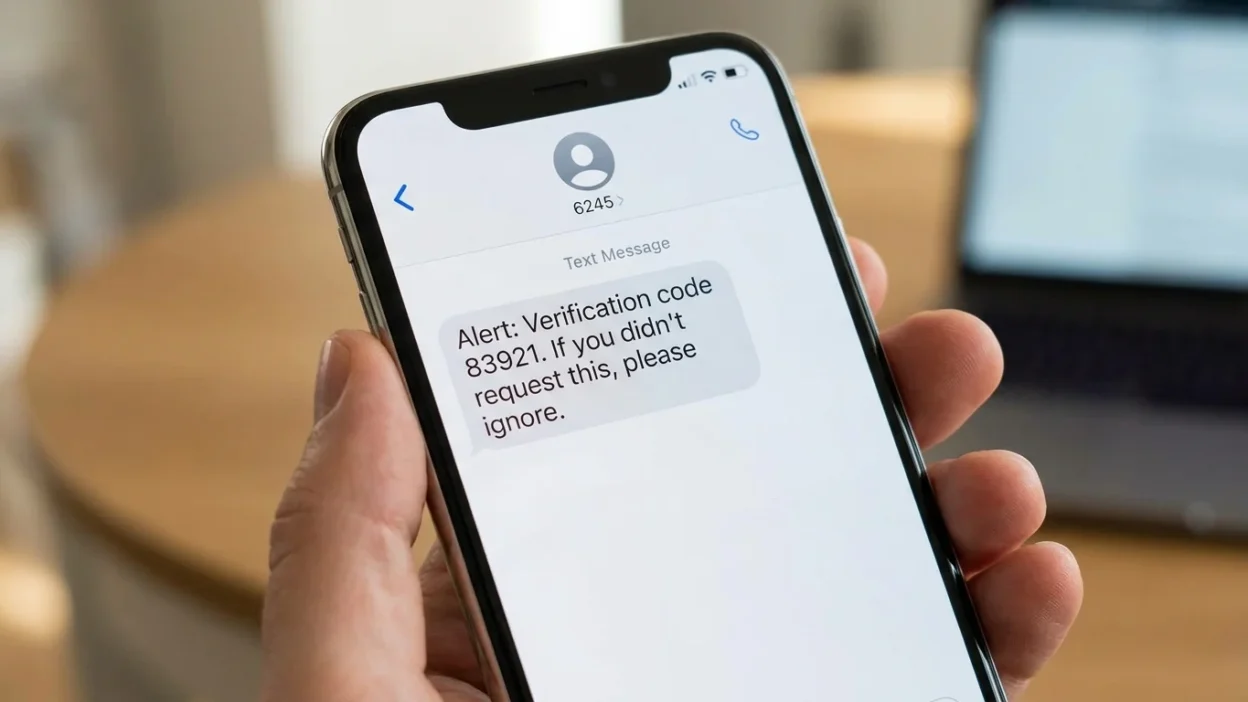
If you received a 6245 text message, you may be wondering who sent it and whether you should be concerned. The four-digit number can look unusual, especially when the message appears without a familiar company name or contact.
In many cases, 6245 is associated with MAIL, because those four digits correspond to the letters M-A-I-L on a phone keypad. Some wireless services have used 6245 as a way to send or receive email through text messaging. For example, carrier documentation has described 6245 as a destination for sending email through SMS.
However, the meaning depends on the carrier, service, message content, and circumstances. A message appearing from 6245 doesn’t automatically prove that it is legitimate or fraudulent. Historical Verizon documentation and community discussions also describe 6245 as an email-to-text gateway, where an email can arrive on a phone as a text.
So, what should you do when 6245 appears on your phone? The safest approach is to understand how the number works, examine the message itself, and avoid interacting with unexpected links or requests for sensitive information.
What Is a 6245 Text Message?
A 6245 text message is a message associated with a four-digit SMS or messaging service number. In some carrier systems, 6245 has been used for mail-related messaging.
- The connection is easy to remember. On a traditional phone keypad, the numbers 6, 2, 4, and 5 correspond to M, A, I, and L. Therefore, 6245 spells MAIL.
- Some wireless providers have historically allowed customers to exchange email and text messages through carrier gateways. In those systems, an email could be converted into an SMS or MMS and delivered to a mobile phone. Verizon community documentation has described messages arriving from 6245 when someone sends mail to a customer’s mobile number through an email-to-text service.
- That explains why the sender may look like a strange number instead of a normal phone number or recognizable email address.
Still, there isn’t one universal meaning for every message displaying 6245. Services and carrier practices can change, and the content of the message matters.
Why Does 6245 Spell MAIL?
The number 6245 is memorable because it maps to MAIL on a standard telephone keypad.
Here is the basic connection:
- 6 = M
- 2 = A
- 4 = I
- 5 = L
That doesn’t mean every message from 6245 is literally an email. Instead, the word helps explain why the number has been associated with mail-related messaging services.
For example, SaskTel documentation says customers can enter 6245 in the recipient field to send an email through text messaging. Bell Canada has also documented 6245 as a destination for sending an email through SMS, although Bell notes that its email-via-text service was scheduled to end after December 31, 2025.
Therefore, seeing 6245 can be a clue that an email-to-text or related messaging system is involved.
Why Did I Receive a 6245 Text Message?
There are several possible explanations.
- The most straightforward possibility is that an email or automated system sent a message through a carrier’s messaging gateway. Historically, Verizon users have reported receiving messages from 6245 when an email was sent to a mobile number through Verizon’s email-to-text system.
- Another possibility is that a device, application, or service generated a message using an email-to-SMS system.
- For example, a notification from a connected device could potentially pass through a messaging gateway. Verizon community discussions have included reports of device notifications appearing through 6245.
- On the other hand, an unexpected message can also be spam or phishing. The number alone isn’t enough to determine the sender’s intentions.
That distinction is important. 6245 itself should not be treated as proof that a message is safe. The message’s wording, links, attachments, requests, and context provide much more useful information.
Is a 6245 Text Message Legitimate?
A message from 6245 can be associated with legitimate messaging technology, but you should evaluate the individual message before trusting it.
Older carrier documentation supports legitimate email-to-text uses for 6245.
At the same time, unwanted messages can use different delivery systems to reach mobile phones. The Federal Trade Commission warns that scammers commonly send unexpected texts designed to make people click links, provide personal information, or contact fraudulent numbers.
Consequently, don’t make your decision based only on the sender ID.
Instead, ask yourself:
- Was I expecting this message?
- Does the content relate to something I recently did?
- Does it identify the sender clearly?
- Does it contain a suspicious link?
- Is it asking for passwords or financial information?
- Is it pressuring me to act immediately?
- Does the message contain unusual grammar or unexpected instructions?
If several warning signs appear, treat the message as suspicious.
What Does a 6245 Message Usually Look Like?
The appearance can vary because 6245 may act as part of a messaging gateway rather than as an ordinary personal phone number.
- A message could contain ordinary text, an automated notification, or information that originated from an email system.
- For instance, an email-to-text message might look less personal than a normal SMS. You could see a short sender number followed by a message that appears to have been generated somewhere else.
- Older Verizon discussions specifically describe messages from 6245 as originating from email-based messaging services.
- However, there isn’t a single standard message format that proves every 6245 message is legitimate.
- That’s why the content deserves more attention than the number itself.
Could a 6245 Text Be Spam?
Yes, it can be possible for an unwanted message to arrive through a system associated with 6245.
Spam messages often try to get attention with unexpected offers, fake alerts, urgent warnings, or suspicious links. The FTC identifies unexpected texts involving account problems, prizes, deliveries, payments, and similar topics as common scam patterns.
A message might claim that:
- Your account needs verification.
- You won a prize.
- A package is waiting.
- Your payment failed.
- You need to confirm personal details.
- Your account will be suspended.
- You must click a link immediately.
These claims aren’t automatically fraudulent. However, an unexpected request deserves independent verification.
For example, if a message claims to come from your bank, open the bank’s official app yourself. Don’t use a link or telephone number supplied in the unexpected text.
The same principle applies to shopping, delivery, employment, financial, and government-related messages.
How to Tell if a 6245 Text Is Suspicious
The message itself usually provides better clues than the four-digit sender.
1. Look for unexpected links
A link is one of the most important warning signs when you weren’t expecting the message.
Scammers can create websites that imitate legitimate companies. The FTC specifically recommends avoiding links in unexpected texts and contacting the supposed organization through information you already know is genuine.
2. Watch for urgent language
Be cautious when a message says you must act immediately.
Phrases involving threats, deadlines, account closures, or unexpected payments can be designed to make you act before thinking.
3. Don’t provide sensitive information
An unexpected text shouldn’t be used as a reason to provide passwords, banking information, Social Security numbers, payment details, or other sensitive data.
The FTC advises consumers not to provide personal or financial information in response to unexpected requests.
4. Consider the context
Think about what you were doing before the message arrived.
If you didn’t create an account, order anything, request a verification code, or contact a company, an unexpected message deserves extra scrutiny.
5. Check the company independently
If the message claims to represent a company, use the company’s known website or official app.
Don’t rely on contact information included in the suspicious message.
What Should You Do When You Receive a 6245 Text?
Your response should depend on the message content.
If the message is expected and clearly connected to something you recognize, you can review it normally.
- If the message is unexpected, slow down before responding.
- First, avoid clicking links or opening suspicious attachments. Next, determine whether you recognize the service or event described in the message.
- If the message asks for sensitive information, don’t provide it. The FTC recommends ignoring unexpected texts that request personal or financial information and verifying legitimate concerns through trusted contact information.
- Finally, consider reporting and blocking the message if it is unwanted.
This simple approach works better than trying to identify the sender solely from the number 6245.
Should You Reply to 6245?
You shouldn’t automatically reply to an unexpected message from 6245.
If the message is unfamiliar, responding can confirm that your number is active or potentially engage you with a scammer.
- The FTC recommends not replying to unexpected texts and not clicking links in them.
- However, context matters. A legitimate messaging service may allow replies as part of its normal email-to-text functionality. Historical Verizon documentation indicates that replies could be associated with the original email-based communication.
- Therefore, don’t use a blanket rule such as “never reply to 6245.” Instead, determine whether you recognize the underlying communication.
- If you don’t recognize it, ignoring and reporting it is generally the safer choice.
Can 6245 Appear on a Phone Bill or Text Log?
It can appear in messaging records when a carrier’s mail or messaging gateway handles a communication.
- Verizon community discussions have documented 6245 appearing in text logs and explained it in connection with email-to-text services.
- This can confuse people because the number doesn’t look like a normal phone number.
- A text log may also show unusual entries when messages move between email and SMS systems. In some cases, replies may appear differently from ordinary person-to-person texts. Verizon community documentation has discussed such behavior in connection with email-based messaging.
- If you’re checking a family member’s or your own account, the log alone may not tell you exactly who initiated the communication.
The actual message content and carrier records can provide additional context.
Is 6245 the Same on Every Carrier?
No. Carrier services are not identical, and the meaning or availability of 6245 can vary.
- Historical and current carrier documentation provides different examples of how 6245 has been used. SaskTel documents 6245 as an email-via-text destination, while Bell Canada has also documented 6245 for email through text messaging.
- Verizon community information has likewise associated 6245 with email-to-text messaging.
- At the same time, services change over time. Bell, for example, stated that its email-via-text service would no longer be available after December 31, 2025.
- So, information about 6245 from an older article may not describe how your carrier handles the number today.
This is one reason carrier-specific information should be checked when you’re troubleshooting a current message.
Why Do Some 6245 Messages Look Like Emails?
Email-to-SMS technology bridges two different communication systems.
- Normally, an email goes to an inbox while an SMS goes to a mobile messaging application. A carrier gateway can connect those systems by converting an email into a text-style message.
- For example, a carrier may assign an email address format based on a customer’s mobile number. The gateway receives the email and delivers its content through the mobile network.
- Historical Verizon information describes this type of process, while carrier documentation from SaskTel also explains sending email through the 6245 mail service.
- As a result, a message can feel unusual because its origin is different from an ordinary phone-to-phone conversation.
The technology itself isn’t inherently suspicious. The important question is whether the particular message is expected and trustworthy.
What If You Accidentally Clicked a 6245 Link?
Don’t panic, but take the situation seriously.
If you clicked a link in an unexpected message, avoid entering additional information. If the page asked for a password, payment information, or other sensitive details, close it and assess what you may have shared.
- The FTC advises consumers not to click links in unexpected messages because fraudulent websites can imitate legitimate services and collect personal information.
- If you entered a password, change it through the legitimate website or app. Use a new password rather than reusing the compromised one.
- If you entered financial information, contact the relevant financial institution using a trusted telephone number or official app.
- If you downloaded something unexpectedly, consider running the security tools available on your device and checking for unusual activity.
Most importantly, don’t continue communicating with the sender simply because you already clicked.
What If You Gave Personal Information to a 6245 Message?
The appropriate response depends on what information you shared.
- If you provided banking or card information, contact your financial institution using a trusted channel. Explain what happened and ask what protective steps are appropriate.
- If you shared identity information, monitor relevant accounts for suspicious activity and consider using the appropriate identity-theft reporting resources.
- The FTC recommends reporting scams and taking steps to protect accounts when sensitive information has been exposed.
- Don’t let embarrassment delay action. Quick, practical steps can limit the consequences of an accidental disclosure.
How to Block Unwanted 6245 Messages
If the messages are unwanted, your phone may provide options to block the sender or filter unknown messages.
- The exact steps depend on your device and messaging application. Android and iPhone devices can offer spam-filtering or blocking features, although the menus can differ by operating-system version.
- Your wireless provider may also offer tools for unwanted messages.
- The FTC recommends using phone-level filtering, carrier tools, or other legitimate spam-blocking options when unwanted texts continue.
- Keep in mind that blocking one sender doesn’t necessarily stop every unwanted message. Spammers can use different sender IDs or delivery methods.
- Therefore, filtering and reporting can be more useful than relying on one block alone.
How to Report a Suspicious 6245 Text
If the message appears to be spam or a scam, you have several reporting options.
- In the United States, the FTC recommends forwarding unwanted texts to 7726, which spells SPAM. This helps wireless providers identify and potentially block similar messages.
- You can also use the spam or junk-reporting feature in your messaging application.
- If you believe you’ve encountered fraud, the FTC accepts reports through its fraud-reporting system. The FCC also provides a complaint process for unwanted texts and other unwanted communications.
- Don’t engage with the sender simply to tell them that you know the message is suspicious. Reporting through established channels is a better approach.
Common Mistakes People Make With 6245 Messages
A few mistakes can make an unfamiliar text more difficult to handle.
Assuming 6245 is automatically a scam is one mistake. The number has legitimate historical connections with email-to-text services, so the sender ID alone doesn’t establish intent.
Assuming it is automatically safe is another mistake. A legitimate-looking sender ID doesn’t guarantee that the content is trustworthy.
Clicking first and checking later can create unnecessary risk. It’s safer to verify unexpected messages before interacting with them.
Calling the number inside the message can also be risky. If a message claims to represent a company, find the company’s contact information independently.
Finally, don’t share verification codes or passwords merely because a message asks for them.
6245 Text Message: Myths vs. Facts
Myth: Every 6245 message is a scam.
Fact: Historical carrier information shows that 6245 has been used for legitimate mail and email-to-text services.
Myth: Every message from 6245 comes directly from Verizon.
Fact: Carrier use of 6245 has varied, and documentation from other carriers has also described 6245-related email services.
Myth: A short code proves the sender is trustworthy.
Fact: The sender ID doesn’t replace normal safety checks. Unexpected links and requests for sensitive information should still be treated carefully.
Myth: You should reply to find out who sent it.
Fact: Replying to an unexpected text can create additional risk. The FTC recommends not responding to unexpected texts and verifying questionable claims independently.
When Should You Contact Your Carrier?
Contact your carrier if 6245 messages keep appearing and you cannot determine their source.
This is particularly useful when:
- The messages appear repeatedly.
- They show up in your billing or messaging records.
- You believe a carrier service is generating them.
- Blocking doesn’t stop the messages.
- You suspect unauthorized messaging activity.
- You need to understand a carrier-specific feature.
Your carrier can examine account-level information that isn’t visible from the message itself.
That can be especially helpful when the communication involves an older email-to-text service or a carrier-specific gateway.
Frequently Asked Questions About 6245 Text Messages
What does 6245 mean in a text message?
6245 spells MAIL on a telephone keypad. It has historically been used by some carriers for mail or email-to-text services.
Is a 6245 text message dangerous?
Not necessarily. The number has legitimate historical uses, but an unexpected message can still contain spam or phishing content. Judge the message by its context and behavior rather than the number alone.
Why am I getting texts from 6245?
You may be receiving a message through an email-to-text or related carrier messaging gateway. Historical Verizon information connects 6245 with email-based messages sent to mobile numbers.
Should I reply to a 6245 message?
If you don’t recognize the message, avoid replying. The FTC recommends ignoring unexpected texts, especially when they contain suspicious requests or links.
Can I block 6245?
You can usually use your phone’s available blocking or spam-filtering features. Your carrier may also provide additional messaging controls.
Does 6245 mean someone has hacked my phone?
Receiving a message from 6245 alone does not establish that your phone has been hacked. The number has legitimate connections with carrier messaging systems. However, investigate further if you notice other unusual account or device activity.
What should I do if a 6245 message asks for money?
Don’t pay through the message. Verify the claim independently using a trusted company website, official app, or known telephone number. The FTC advises consumers not to provide financial information in response to unexpected requests.
Can 6245 messages be spam?
Yes, unwanted messages can reach mobile users through different messaging systems. If the message is suspicious, don’t click links or reply. Report it through your messaging app or forward it to 7726 in the United States.
Conclusion
A 6245 text message can look mysterious, but the number has a straightforward history: 6245 spells MAIL on a phone keypad and has been used by some wireless services for mail or email-to-text communication. Carrier documentation and historical support records confirm legitimate uses for this type of messaging. However, the sender ID alone cannot tell you whether a particular message is trustworthy. If the message is unexpected, contains a suspicious link, requests personal information, or creates pressure to act quickly, treat it cautiously. Don’t click unknown links, don’t share sensitive information, and verify important claims through a trusted source. For unwanted messages in the United States, you can report them through your messaging app or forward them to 7726.