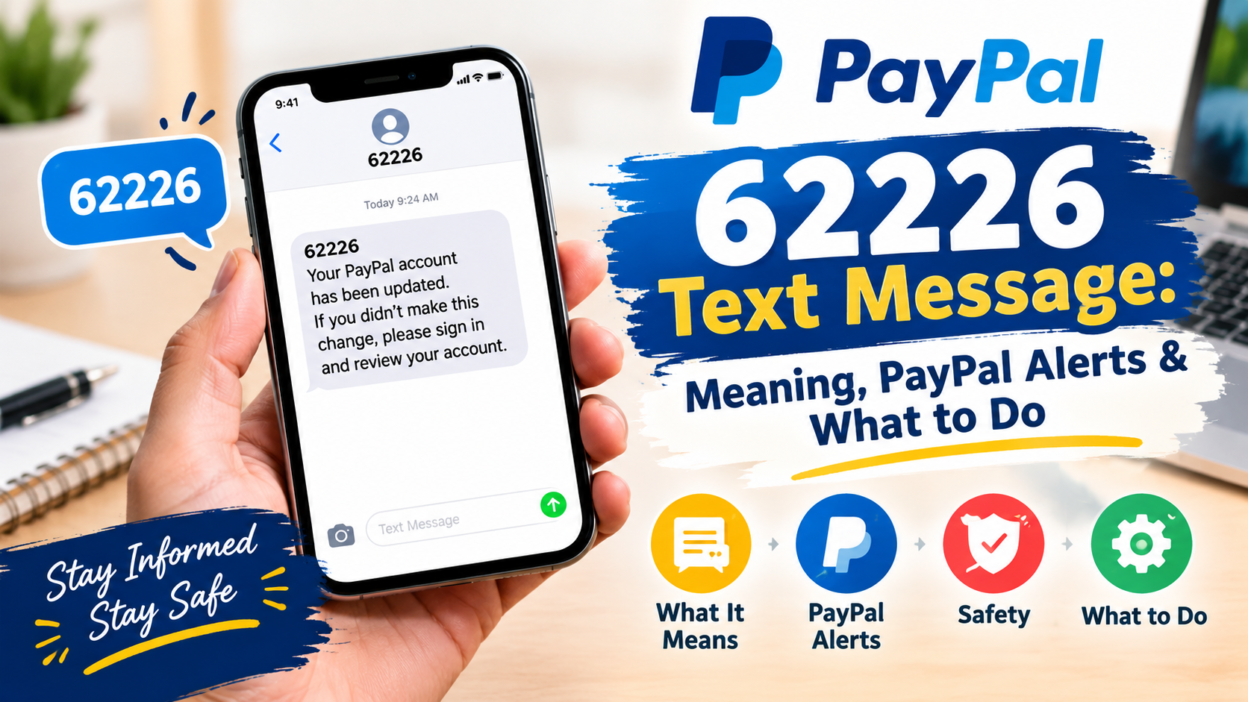
If you received a 62226 text message, you may be wondering who sent it, why it appeared on your phone, and whether you should respond. This five-digit number has been associated with SMS messages, including historical PayPal security and transaction notifications in the UK. However, a message appearing to come from a familiar company does not automatically prove that the message is genuine.
The situation deserves a little care because short codes can be used for legitimate services, while scammers can also imitate brands or use deceptive links. PayPal currently confirms that it uses SMS for certain security checks, including activity confirmation and one-time codes, although its current UK help pages give examples of other PayPal numbers rather than confirming 62226 as its current universal sender.
So, if 62226 text message appears on your phone, focus on the content and verify the activity through the official account or app instead of trusting the sender number alone.
What Is a 62226 Text Message?
A 62226 text message is an SMS sent from the five-digit short code 62226. Search results and historical user reports strongly associate this short code with PayPal-related messages in the United Kingdom.
Older PayPal community discussions show messages from 62226 asking customers to confirm transactions or security activity. Some users reported receiving verification codes or transaction-confirmation messages after making genuine payments.
However, there is an important distinction between historical use and current verification. A short code may change ownership, routing, or purpose over time. In addition, scammers can imitate the wording or branding of legitimate companies.
Therefore, you shouldn’t decide that a message is genuine simply because it says “PayPal” or comes from a recognizable-looking number.
Why Did I Receive a 62226 Text?
There are several possible explanations.
One possibility is that the message relates to activity connected with a PayPal account. PayPal says it may send SMS messages when it needs to confirm account activity or verify a user’s identity. Depending on the situation, the message can ask you to confirm activity or provide a six-digit security code.
Another possibility is that someone entered your phone number while attempting to create, access, or use an account. PayPal specifically says people without an account can sometimes receive unexpected messages because someone registered an account using their information or because a message was sent as part of a phishing attempt.
There is also the possibility of fraud. Recent online reports about 62226 include messages claiming to be from PayPal, account restrictions, suspicious transactions, or verification requests. Those reports are user-generated and aren’t proof that every message from the number is fraudulent.
The safest approach is to verify the underlying event independently.
Is 62226 a PayPal Number?
Historically, 62226 has been associated with PayPal SMS messages in the UK. Older PayPal community discussions document transaction-confirmation messages from this short code, and numerous user reports describe receiving PayPal-related texts from it.
However, that doesn’t mean every message using 62226 is currently an official PayPal communication.
PayPal’s current UK help information confirms that it uses short-code SMS for security checks. It says customers may receive a message asking them to reply with 1 or 2, or a message containing a six-digit code. The same page notes that current PayPal verification messages can come from numbers in the 725–729 range.
That distinction matters.
A number can have a legitimate historical connection with a company without every future message using that number being trustworthy. For that reason, treat the message content and your actual account activity as the important evidence.
What Kind of Messages Can Come From 62226?
Historical reports show several different types of messages associated with this short code.
One type involves transaction verification. A message may tell you that a payment was detected and ask whether you authorized it. Older reports describe messages asking recipients to reply with a number corresponding to “yes” or “no.”
Another type involves verification codes. Some users have reported receiving PayPal codes through 62226, particularly around account or payment activity. User reports alone shouldn’t be treated as official documentation, but they help explain why people search for this short code.
A third category involves suspicious account warnings. Reports describe messages claiming that an account or service has been restricted because of unusual activity and directing the recipient to a website. This type of message deserves particular caution because phishing scams commonly use urgent account-warning language.
The exact wording therefore matters more than the number alone.
How to Tell Whether the Message Is Genuine
Start by checking whether the message matches something you actually did.
For example, suppose you made a PayPal purchase a few minutes ago and then received a security message asking you to confirm that transaction. That connection gives the message context, but it still doesn’t prove authenticity.
Next, open the PayPal app or manually visit the official PayPal website. Don’t use a link contained in the text. Look for the same transaction or security notification inside your account.
PayPal itself advises users not to click links in suspicious messages. Its security guidance recommends forwarding unusual PayPal texts to its phishing address, blocking the sender, and deleting the message.
Also watch for common warning signs:
- The message creates extreme urgency.
- It threatens immediate account closure.
- It asks for your password.
- It requests banking information.
- It asks for a full card number.
- It contains a suspicious website address.
- It asks you to install software.
- It tells you to call an unfamiliar number.
- The message concerns an activity you never performed.
One warning sign doesn’t automatically prove fraud. Several warning signs together should make you stop and verify the situation independently.
What Should You Do If You Get an Unexpected 62226 Text?
Don’t panic.
First, avoid clicking anything in the message. If the SMS contains a link, leave it unopened until you’ve independently confirmed why you received the message.
Next, check your account directly. If the message claims that you made a payment, look at your PayPal transaction history. If you don’t see the transaction, don’t assume the text is accurate.
If you don’t have a PayPal account, the safest response is generally not to engage with the message. PayPal says people without accounts can receive unsolicited messages and that unexpected SMS messages claiming to involve account access may be phishing attempts.
If you’re using a UK mobile service and you’re concerned about unexpected premium-rate charges, review your phone bill. Ofcom explains that five- and six-digit mobile short codes can be used for premium-rate services, and charges can appear on a phone bill or prepaid balance.
Should You Reply to 62226?
Don’t reply simply because the message tells you to.
If you receive a transaction-confirmation request, verify the transaction independently before taking any action. This is particularly important when the message asks you to send a response that could create a charge.
Ofcom explains that some five- and six-digit SMS short codes can be premium-rate services. It recommends checking costs before texting a short code.
There is another reason to avoid casual replies. Responding to an unexpected message confirms that your phone number is active and may expose you to additional unwanted communications.
If the message appears suspicious, don’t use the reply option to ask whether it is real. Instead, verify the claim through the company’s official app or website.
Can a 62226 Message Be a Scam?
Yes, a message associated with 62226 can potentially be used in a scam, particularly if the content directs you toward a suspicious website or requests sensitive information.
That doesn’t mean every historical 62226 message was fraudulent. In fact, older reports document genuine-looking PayPal transaction and verification messages associated with the number.
The important lesson is that the sender number isn’t enough to authenticate a message.
Scammers often rely on familiar company names because recipients are more likely to react quickly when they see a brand they recognize. A message saying “PayPal” can create a false sense of trust.
Ofcom’s current consumer guidance recommends not engaging with suspicious messages, not clicking links, not pressing buttons, and not sharing personal or financial information.
What If the Text Mentions a PayPal Transaction You Didn’t Make?
Treat that situation seriously, but don’t follow instructions inside the SMS.
Instead, independently access your PayPal account and inspect your recent activity. Look for unfamiliar payments, login attempts, or account changes.
If you find suspicious activity, use PayPal’s official security and account-support channels. PayPal currently recommends using its website or app to access customer support and account assistance.
If you don’t have a PayPal account, don’t create one or enter financial details simply because an SMS tells you to. PayPal says unsolicited messages can sometimes result from phishing attempts or someone using your information incorrectly.
Most importantly, don’t call a phone number included in a suspicious text. Search for the company’s official support information separately.
What If the Message Contains a Verification Code?
A verification code is sensitive information.
Never give a login or security code to another person over the phone, through a text conversation, or in response to an unexpected request.
If you initiated a legitimate login or transaction, enter the code only where you expect to enter it, such as the official service’s login or checkout screen.
If you didn’t request the code, don’t use it. An unexpected code can mean someone is attempting to access an account associated with your phone number.
PayPal explains that SMS codes can be part of its identity-verification process and that codes can expire after a short period.
The safest rule is simple: a verification code belongs only to the person completing the verified action.
What Does a Premium SMS Short Code Mean?
A short code is a shortened number used by organizations and services to send or receive text messages.
In the UK, five- and six-digit mobile short codes can sometimes be connected with premium-rate services. Ofcom explains that these services can include donations, competitions, entertainment, information services, and other phone-paid activities.
That doesn’t mean every short code automatically costs money.
The cost depends on the service and the specific action involved. Receiving an ordinary SMS and replying to a premium-rate service are not necessarily the same thing.
If you think a charge occurred, check your mobile bill. Ofcom says your mobile provider can help identify the provider behind an unexpected premium-rate charge. It also provides a premium-rate service checker for identifying services associated with numbers shown on bills or messages.
Why Do People Confuse 62226 With Other PayPal Numbers?
PayPal uses different communication channels and numbers for different services, and those arrangements can change.
Its current UK help information gives examples of PayPal SMS sender numbers for two-factor authentication and explains that security messages may be sent through short-code systems.
At the same time, older discussions and user reports connect 62226 with PayPal transaction messages.
This difference can create confusion when people search for the number years after receiving a message.
Rather than relying on an old list of “official numbers,” use the current account activity and the company’s current security guidance to verify a message.
Common Mistakes to Avoid
One common mistake is clicking a link before thinking about the message. A professional-looking SMS can still lead to a fraudulent website.
Another mistake is searching for the phone number and trusting the first result completely. Community reporting websites can provide useful clues, but user reports aren’t the same as official confirmation. Some reports may be outdated, incorrect, or based on individual experiences.
A third mistake is assuming that having the correct transaction amount proves a message is genuine. Fraudulent messages can contain convincing details.
People also sometimes respond to unexpected texts to “test” the sender. That’s unnecessary. If you want to verify an account issue, check the account directly.
Finally, don’t share a verification code with someone who contacts you and claims to be customer support. Legitimate support processes shouldn’t require you to hand over a security code simply because someone asks for it.
What If You Already Clicked the Link?
Don’t assume that clicking automatically means your account has been compromised. Your next steps depend on what happened after the click.
If the page only opened and you entered nothing, close it and avoid returning to it.
If you entered a password, change that password through the legitimate website or app. If you reused the same password elsewhere, change it there too.
If you entered financial information, contact the relevant financial institution through its official contact method and explain what happened.
If you downloaded an unexpected application or file, don’t open it again. Consider having your device checked using trusted security software.
If you shared a PayPal verification code, review your account immediately and change your credentials through the official PayPal service.
The faster you respond after sharing sensitive information, the more options you usually have for protecting the affected account.
How to Report a Suspicious 62226 Message
If a message appears to impersonate PayPal, PayPal provides a specific process for reporting suspicious communications.
Its UK security guidance says users should avoid clicking links in unusual texts and can forward suspicious SMS messages to phishing@paypal.com. PayPal also recommends blocking the sender and deleting the message afterward.
You can also contact your mobile provider if you believe the message caused an unexpected premium-rate charge.
Ofcom advises consumers with unexplained premium-rate charges to contact their mobile provider, who can identify the service provider associated with the charge.
For suspected scams, keep the original message if you need evidence for reporting. Take screenshots if appropriate, but avoid sharing personal information publicly.
Does Blocking 62226 Stop Charges?
Blocking a sender can stop future messages from appearing on your device, but blocking alone doesn’t necessarily resolve an existing premium-rate charge.
Ofcom specifically notes that blocking texts does not stop charges that may already be associated with a service.
If you notice an unexpected charge, check your bill and contact your mobile provider. You may also need to contact the company responsible for the service.
This distinction is useful because deleting a message and resolving a billing issue are two separate actions.
62226 Text Message: A Simple Safety Checklist
If you want a quick way to handle an unexpected message, use this process:
1. Stop. Don’t respond immediately, especially if the message creates urgency.
2. Read the entire message. Look for requests for money, passwords, codes, or personal information.
3. Don’t click the link. Open the official service independently instead.
4. Check your account. Look for the transaction, login, or security event mentioned in the SMS.
5. Verify through official support. Use the company’s official app or website rather than contact details supplied by the text.
6. Protect your account. If you discover unauthorized activity, change your password and review security settings.
7. Check your bill. If you replied to a short code or suspect a premium-rate charge, inspect your mobile bill.
8. Report suspicious activity. Use the company’s official reporting channel and your mobile provider where appropriate.
This approach works better than trying to decide whether a number is “safe” from the number alone.
Why Context Matters More Than the Number
A phone number can provide a useful clue, but context provides stronger evidence.
For example, a person who has just completed a PayPal payment and receives a matching security notification has a different situation from someone who has never used PayPal but receives a message claiming their account has been suspended.
Similarly, a message containing a verification code is different from one demanding payment through an unfamiliar website.
That is why a good verification process considers three things: what the message says, whether you performed the related action, and what the official account shows.
When those three pieces don’t match, slow down before doing anything.
Frequently Asked Questions About 62226 Text Message
What does 62226 mean in a text message?
62226 is a five-digit SMS short code that has historically been associated with PayPal-related messages in the UK. Its presence alone doesn’t prove that a current message is genuine.
Is 62226 definitely PayPal?
Not necessarily. Historical sources associate 62226 with PayPal communications, but current PayPal documentation does not establish that every message from this number today is an official PayPal message. Verify the message through your account instead.
Is a 62226 text message a scam?
It can be, but not every historical message associated with the number was necessarily fraudulent. User reports include both genuine-looking PayPal communications and suspected phishing messages.
Should I reply to a 62226 message?
Don’t reply automatically. First verify the message through the relevant company’s official app or website. Short-code replies can sometimes involve charges, particularly with premium-rate services.
What if I don’t have PayPal?
If you don’t have a PayPal account and receive an unexpected PayPal-related SMS, don’t click links or provide information. PayPal says unsolicited messages can sometimes be phishing attempts sent to random phone numbers.
Can 62226 charge me for replying?
Some five- and six-digit UK short codes can operate as premium-rate services, so charges can depend on the specific service and action. Check your mobile provider’s pricing and your bill if you’re concerned.
What should I do if the text contains a suspicious link?
Don’t open the link. Instead, access the claimed service directly through its official app or website. PayPal specifically advises users not to click links in suspicious messages.
What if I already entered my password or payment information?
Change the affected password through the official website or app and contact the relevant financial provider if financial information was exposed. Also review your account for unusual activity.
Conclusion
A 62226 text message can be confusing because the number has historical links to PayPal-related SMS communications in the UK, while online reports also document suspicious messages using the same short code. The safest approach is not to trust or reject a message based on the number alone. Instead, check whether the claimed activity appears in your official account, avoid links and unexpected replies, protect any exposed credentials, and contact the company or mobile provider through independently verified channels when necessary. PayPal’s current guidance also recommends avoiding suspicious links and reporting unusual messages through its security process.