Sometimes, typing every word feels like too much. Maybe you want to hear your loved one’s voice, explain something quickly, or share a thought that feels more natural when spoken.
If you are wondering how to send voice message on iPhone, the process is simple. In the current Messages app, Apple lets you record an audio message directly inside a conversation. You can review it, continue recording, cancel it, or send it when you are ready.
A voice message can make an ordinary conversation feel more personal. Instead of sending a long paragraph, you can simply speak from the heart.
🎙️ How to Send Voice Message on iPhone
The easiest method is through the built-in Messages app. You do not need to install another app or record the audio separately.
Follow these steps:
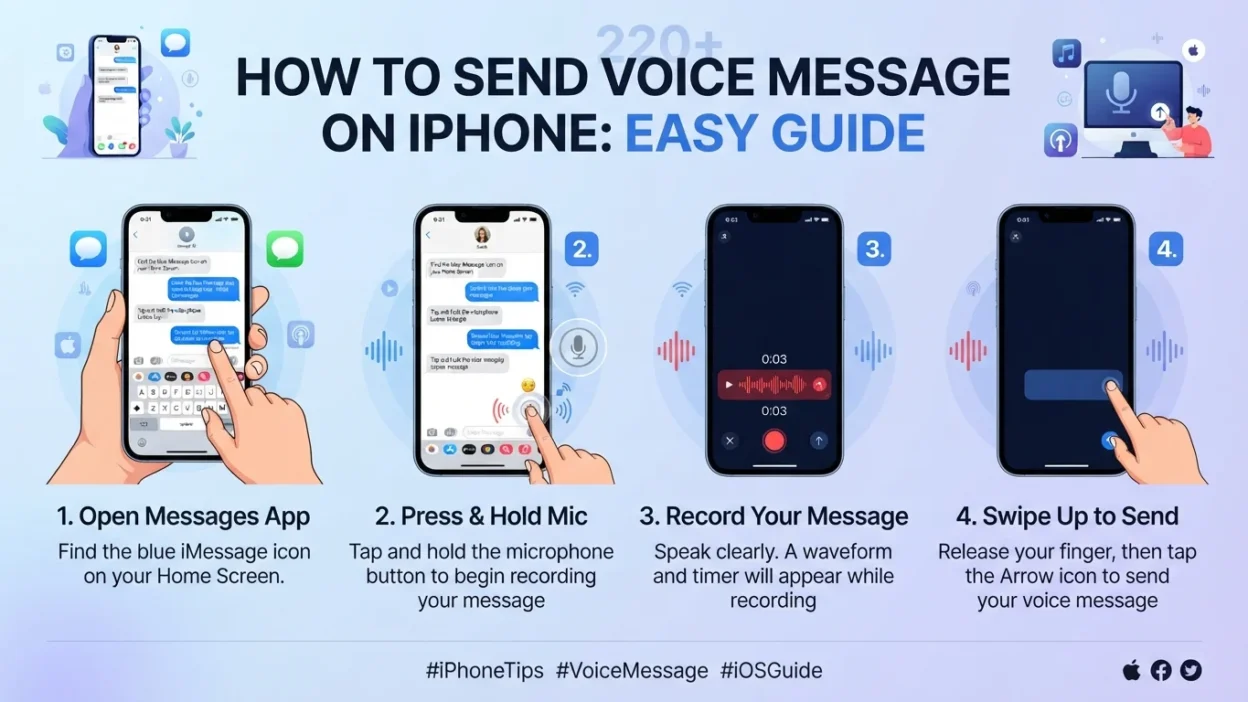
First, open Messages. Find the conversation with the person you want to contact. You can also start a new conversation.
Next, tap the Add button. In the conversation, tap the Add (+) button near the text field.
Then, choose Audio. Tap Audio from the available options. Your iPhone will begin preparing the audio recording.
Start speaking. Say your message naturally. You can keep it short or take your time explaining what you mean.
Tap Stop when you finish. After recording, tap the Stop button to pause or end the recording.
Finally, tap Send. Your audio message will appear in the Messages conversation and can be played by the recipient.
That is all it takes.
❤️ Why Voice Messages Feel More Personal
Text messages are convenient. However, they cannot always carry the warmth behind your words.
A voice can communicate excitement, kindness, humor, concern, or reassurance. For example, saying “I’m thinking about you” can feel very different from simply typing it.
Moreover, voice messages are useful when your hands are busy or when you have more to say than you want to type.
They can also help when emotions are difficult to explain through text.
📱 A Quick Example
Imagine that a friend has had a difficult day.
You could type:
“I hope everything gets better. I’m here for you.”
Or, you could send a short voice message and say it naturally.
Your tone may communicate comfort that written words cannot fully express.
That small difference can matter.
✨ How to Review a Voice Message Before Sending
You do not always have to send an audio recording immediately.
After you finish recording, Apple gives you options to manage the message. You can play the recording to review it, send it, continue recording, or cancel it.
This is especially helpful when your message is important.
For example, perhaps you are sending:
- A heartfelt apology
- A birthday greeting
- A prayer for someone
- A thoughtful message to a family member
- Instructions that are easier to explain aloud
- A quick update while you are busy
Before sending, listen once if you want to make sure everything sounds right.
🎧 How to Continue Recording
Sometimes, you finish speaking and suddenly remember one more thing.
Thankfully, you do not necessarily need to start again.
After stopping your recording, Apple provides a Continue Recording option. Tap it to add more audio to the same message.
This can be useful when your thoughts come naturally rather than all at once.
For instance, you might say:
“I wanted to tell you something…”
Then pause.
A moment later, you remember the most important part.
Instead of deleting everything, simply continue recording.
❌ How to Cancel a Voice Message
Changed your mind?
That happens.
After recording, you can cancel the audio message instead of sending it. Apple provides a Close or Cancel option during the recording workflow.
This gives you a moment to reconsider before your words reach someone else.
It can be especially useful when you are emotional. Sometimes, taking a breath before sending is the kindest choice.
⚡ The Fast Way to Send Another Audio Message
Once you become comfortable with audio messages, there is an even quicker method.
Apple says you can touch and hold the Record Audio button in the text field to send follow-up audio messages more quickly.
This can make conversations feel more natural.
Instead of repeatedly searching through menus, you can use the recording control directly when available.
🌿 When a Voice Message Is Better Than Text
Not every conversation needs an audio message. Still, there are moments when your voice makes more sense.
When emotions matter: A voice can carry warmth and sincerity.
When the message is long: Speaking may be faster than typing several paragraphs.
When you are busy: You can communicate without spending as much time typing.
When explaining something: A spoken explanation can sometimes feel clearer and more natural.
When someone needs encouragement: Hearing a caring voice may make a simple message feel more meaningful.
When distance feels heavy: A familiar voice can bring a little comfort to an ordinary day.
💕 Real-Life Moments That Call for a Voice Message
Picture a parent receiving a quick message from their child.
Maybe it is only thirty seconds long.
There is laughter in the background. The words are simple. Nothing dramatic happens.
Yet that recording may become something worth keeping.
Likewise, imagine sending your partner a message after a long day:
“I just wanted you to know that I’m thinking about you. I hope you get some rest tonight.”
It does not need to be perfect.
In fact, the natural pauses and little imperfections can make a voice message feel genuine.
🙏 Voice Messages for Encouragement and Prayer
Voice messages are not only practical. They can also become a beautiful way to encourage someone spiritually.
If a friend is struggling, you might record a short prayer.
You could say:
There is no need to make the prayer complicated.
Speak honestly. Keep your words gentle. Most importantly, let your message come from a sincere place.
Sometimes, we all feel alone. A thoughtful voice message can remind someone that they are remembered.
🔊 Can You Listen to a Received Audio Message?
Yes.
When someone sends you an audio message in Messages, open the conversation and tap the Play button on the recording. Apple also allows you to move through an audio message and adjust playback speed by touching and holding the playback controls.
So, if someone sends you a long recording, you have options besides simply listening from beginning to end at normal speed.
You can also save an audio message when you want to keep it.
💾 How to Keep an Audio Message
One important detail can surprise new users.
Apple says audio messages are automatically deleted from the conversation on your iPhone two minutes after you send or listen to them, unless you save them. The recipient can still play a received recording after that; the automatic deletion applies to the copy on your iPhone.
If the message is meaningful, tap Keep to save it.
This is worth remembering when someone sends you a special recording.
Maybe it is a birthday wish from someone you love.
Maybe it is a child’s voice.
Maybe it is a final encouraging message from a friend.
Some recordings are too precious to leave to automatic deletion.
⚙️ How to Stop Audio Messages From Expiring
If you regularly exchange voice messages, you may prefer to keep them automatically.
On your iPhone, go to:
Settings → Apps → Messages → Expire → Never
Apple provides this setting under Audio Messages.
That way, you can choose to keep audio messages rather than having them automatically removed from your conversation.
However, saving everything may use additional storage over time. So, it is still wise to review old conversations occasionally.
📝 Audio Message Transcriptions on iPhone
Another useful feature is transcription.
Apple says audio messages can include transcriptions of what was spoken. However, transcription availability depends on supported languages and features.
This can be helpful when you are somewhere quiet enough to read but not convenient for listening.
For example, imagine receiving a long voice message while sitting in a meeting.
You may not want to play the recording aloud.
A transcript can make the information easier to understand without disturbing anyone nearby.
🌎 What If You Are Messaging Someone Who Does Not Have an iPhone?
This is where message types matter.
Apple explains that iPhone Messages can use iMessage, RCS, or SMS/MMS, depending on the conversation and available support. iMessage uses blue bubbles, while RCS and SMS/MMS generally appear as green bubbles.
However, the exact messaging features available can depend on the recipient’s device, carrier, region, and messaging setup.
Therefore, if an audio option does not appear or a message will not send, checking your Messages setup can be a sensible first step.
Apple recommends making sure Messages is properly configured and connected to Wi-Fi or cellular service when appropriate.
🌸 A Simple Reminder Before You Send
Before pressing Send, ask yourself one small question:
“Is this what I truly want the other person to hear?”
If yes, send it with confidence.
If not, take a breath.
Voice messages are powerful because they feel immediate. Your tone, pauses, laughter, and emotions all travel with your words.
That is exactly why they can create connection.
A short recording can say:
I miss you.
I’m proud of you.
I’m praying for you.
I’m here.
You are not alone.
Sometimes, those are the words someone needs most.
🎙️ How to Send Voice Message on iPhone Without Stress
Learning how to send voice message on iPhone is easy once you know where the audio controls are. Still, the first attempt can feel confusing if you have never used the feature before.
The good news is that you do not need to be a technology expert.
With a few simple taps, you can turn your thoughts into a personal audio message. Better yet, you can take your time and speak naturally.
💡 What Should You Say in a Voice Message?
Sometimes, the hardest part is not finding the button.
It is knowing what to say.
A voice message does not need to sound polished. In fact, natural words often feel more meaningful than carefully written sentences.
You could begin with:
- “Hey, I just wanted to check on you.”
- “I was thinking about you today.”
- “I hope your day is going well.”
- “I wanted to tell you something quickly.”
- “I just wanted you to hear my voice.”
- “I’m proud of you. Keep going.”
- “I’m praying that everything works out for you.”
Then, simply continue from your heart.
There is no perfect script.
❤️ For Someone You Love
A voice message can add warmth to a relationship.
You might say:
It does not need to be long.
Sometimes, twenty seconds of genuine affection can mean more than a page of text.
🌻 For a Friend Who Is Struggling
When someone feels overwhelmed, avoid trying to solve everything.
Instead, offer presence.
Try saying:
That simple reassurance can create a sense of connection.
Moreover, your voice can communicate compassion without requiring complicated words.
🙏 Short Voice Messages for Spiritual Encouragement
A voice message can also become a small blessing during someone’s difficult day.
For example:
Or keep it even shorter:
These messages are personal without making promises about what the future will bring.
That distinction matters.
A comforting message should offer hope while respecting the reality of what someone may be experiencing.
🌙 A Good Night Voice Message
Before going to sleep, a few gentle words can make someone feel remembered.
You could say:
Likewise, you could send a simple blessing:
A voice message does not have to be dramatic.
Often, quiet kindness is enough.
☀️ A Morning Voice Message
Morning messages can work beautifully when someone needs encouragement.
Try:
Because the message is spoken, it can feel more like a personal conversation.
That is one reason audio messages have become such a useful communication option.
🛠️ What to Do If Your Voice Message Is Not Working
Occasionally, the audio feature may not work as expected.
Do not panic.
Start with the basics
🔐 Think About Privacy Before Sending
Voice messages can contain more information than you realize.
Your voice reveals emotion. Background sounds may also reveal where you are or what is happening around you.
So, pause before sending sensitive information.
For example, avoid recording private details when other people are nearby.
Likewise, be careful when discussing passwords, financial information, or other confidential matters.
A little awareness can protect your privacy.
🎧 How to Make Your Voice Messages Sound Better
You do not need expensive equipment.
Your iPhone can produce a clear recording when you use a quiet environment.
Try these simple habits:
Find a quieter place. Background noise can make your words difficult to understand.
Hold the phone naturally. Avoid covering the microphone with your hand.
Speak clearly. You do not need to speak loudly. Just use a comfortable pace.
Pause between ideas. Short pauses make longer messages easier to follow.
Keep important messages focused. If you have several unrelated things to say, consider sending separate recordings.
Most importantly, sound like yourself.
Perfect audio is less important than genuine communication.
🧡 When a Voice Message Can Heal Distance
Distance can change everyday communication.
Maybe your family lives in another state.
Perhaps a close friend moved across the country.
Or maybe someone you love simply has a busy schedule.
In those moments, a voice message can create a small bridge.
You can hear the smile in someone’s voice.
You can recognize their familiar way of speaking.
You can feel a little closer, even when you are physically far away.
That is the emotional value of audio messaging.
💬 Voice Message vs. Text Message
Both options have their place.
Voice MessageText MessageFeels more personalEasy to scan quicklyCommunicates toneEasy to editUseful for longer thoughtsConvenient in quiet placesCan feel more conversationalEasy to search laterHelpful for emotional messagesBetter for quick information
Neither option is automatically better.
Instead, choose based on the moment.
If your message depends heavily on emotion, a voice recording may be ideal.
On the other hand, if you need to communicate an address, date, number, or detailed information, text may be easier.
🌿 A Voice Message Does Not Need to Be Perfect
This is worth remembering.
You may pause.
You may laugh.
You may stumble over a sentence.
You may say, “Wait, let me explain that again.”
That is okay.
Real conversations are rarely perfect.
In fact, those little imperfections can make a recording feel human.
Sometimes, people do not need a polished message. They simply want to hear from you.
⏳ Keep Longer Messages Organized
If you have a lot to say, consider dividing your thoughts.
For example:
Message one: Explain what happened.
Message two: Share how you feel.
Message three: Say what you hope happens next.
This approach can make your conversation easier to follow.
Additionally, shorter recordings may feel less overwhelming for the person receiving them.
💭 What If You Send the Wrong Voice Message?
It happens.
You may accidentally send a recording before you finish speaking.
You might choose the wrong conversation.
Or perhaps you simply change your mind.
If the message has already been sent, check the options available in your Messages conversation. Depending on the messaging service and your iPhone software, message-management options can vary.
Therefore, avoid assuming that every message can always be recalled.
When a recording contains something sensitive, think carefully before pressing Send.
🌼 Use Your Voice to Encourage Someone Today
Think of someone who may need encouragement.
Maybe they are beginning a new job.
Maybe they are grieving.
Perhaps they are waiting for an important answer.
Or maybe they are simply having an ordinary day.
Send them a short voice message.
You could say:
That may take less than a minute.
Yet the person could replay those words when they need strength.
🌟 The Most Meaningful Voice Messages Are Often Simple
You do not need a dramatic speech.
You do not need perfect grammar.
You do not need a long explanation.
Sometimes, the most meaningful recording is only a few words:
“I’m here.”
“I miss you.”
“I believe in you.”
“You matter to me.”
“I’m praying for you.”
“Call me when you can.”
Simple words can carry enormous emotional weight when they are sincere.
This small routine can make voice messaging easier and more thoughtful.
🌟 How to Send Voice Message on iPhone: Final Tips
By now, you know how to send voice message on iPhone using the Messages app. The process is straightforward, but a few small habits can make your experience even better.
First, remember that a good voice message does not need to be long. A clear, sincere message can be more meaningful than several minutes of talking.
Also, give yourself permission to sound natural. Your voice does not need to sound perfect. What matters most is that your message is easy to understand and appropriate for the person receiving it.
📲 A Simple Voice Message Routine
If you are new to audio messages, use this simple routine:
Open Messages. Choose the conversation where you want to send the recording.
Tap the Add button. Choose Audio from the available options.
Speak naturally. Say what you want to communicate without worrying about perfection.
Stop the recording. Review it if the message is important.
Send when ready. Once you are comfortable, tap Send.
That is the basic process.
With practice, it becomes second nature.
🧭 What If You Cannot Find the Audio Option?
The Messages interface can look different depending on your iPhone model, iOS version, language, and messaging setup.
Therefore, do not worry if your screen does not look exactly like someone else’s.
Look for the Add (+) button near the message field. From there, check the available options for Audio.
Apple’s current iPhone guide explains that audio messages can be recorded from the Messages conversation.
If you still cannot find the option, check whether your iPhone is running current software and whether Messages is configured correctly.
🔧 A Few Troubleshooting Steps
When audio messaging does not behave as expected, work through the problem slowly.
Check Your Connection
Make sure your iPhone has a working Wi-Fi or cellular connection.
If other messages are also failing, the problem may not be related specifically to audio.
Check Your Microphone
Try another recording app to determine whether your microphone is working properly.
If other recordings sound clear, the issue may be related to Messages rather than the microphone itself.
Restart the App
Close Messages and open it again.
Then, return to the conversation and try recording.
Restart Your iPhone
A simple restart can resolve temporary software problems.
Afterward, test the feature again.
Check Your iOS Version
Apple regularly changes features and interface details through software updates.
So, if your iPhone looks different from an older tutorial, check Apple’s current instructions instead of relying on an outdated screenshot.
💾 Remember to Save Important Audio Messages
One detail deserves special attention.
Apple says audio messages are automatically removed from your iPhone conversation after two minutes unless you choose to keep them.
That means you should not assume every meaningful recording will remain available forever.
If someone sends you something special, use the available Keep option.
You may also choose to change the Audio Messages expiration setting to Never through Messages settings.
This is particularly useful for recordings that have sentimental value.
❤️ Voice Messages for Special Moments
Some conversations deserve more than a quick text.
Birthday Wishes 🎂
Instead of typing “Happy birthday,” use your voice.
You might say:
Your voice can make the greeting feel personal.
Congratulations 🎉
A new job, graduation, engagement, or personal achievement deserves genuine celebration.
Saying Thank You 🌷
A sincere thank-you message does not need many words.
That small sentence can carry more warmth than a typed response.
Checking on Someone 🤍
If someone has been quiet lately, reach out.
You could say:
This gives the other person space while still showing care.
🙏 A Gentle Blessing to Send by Voice
If you want to send a spiritual message, keep it sincere and comforting.
Another option is even simpler:
These messages work well because they focus on comfort rather than unrealistic promises.
🌿 When Not to Send a Voice Message
Voice messages are useful, but they are not ideal for every situation.
For example, a written message may be better when:
- You need to share an address.
- You are sending exact numbers.
- The information needs to be copied later.
- The recipient is in a quiet environment.
- The message contains sensitive details.
- You need a clear written record.
In those situations, text may be more practical.
The best communication method is the one that fits the moment.
💬 How to Make Your Messages More Natural
If you feel awkward recording yourself, try pretending that the person is standing beside you.
Then speak the way you normally would.
Do not write an entire script first unless you need one.
Instead, remember three simple points:
What happened?
How do I feel?
What do I want them to know?
This keeps your message focused without making it sound rehearsed.
🌻 A Small Voice Message Can Make a Big Difference
Imagine receiving a voice message after a difficult day.
You press play.
Someone you care about says:
The words are simple.
Yet hearing them may bring comfort.
That is the quiet beauty of voice messaging. It turns technology into something deeply human.
❓ Frequently Asked Questions
1. How do I send a voice message on iPhone?
Open the Messages app and select a conversation. Tap the Add (+) button, choose Audio, record your message, and then tap Send. Apple also provides a quicker recording method by touching and holding the Record Audio button when available.
2. Can I listen to a voice message before sending it?
Yes. After recording, you can review the audio before sending it. This is useful when the message is important or contains several details.
3. How long can an iPhone voice message be?
The practical recording length can depend on the current iOS version and messaging setup. For longer thoughts, consider keeping the recording organized and focused rather than speaking without a clear direction.
4. Why did my voice message disappear?
Apple says audio messages can automatically expire from your iPhone conversation after two minutes unless you choose Keep. You can also adjust the Audio Messages expiration setting in Messages.
5. Can I save an important voice message?
Yes. When an audio message is important, use the Keep option so it does not automatically disappear from your conversation. You can also set audio messages to remain longer through your Messages settings.
6. Can I send an audio message to someone without an iPhone?
Messaging features can vary depending on the recipient’s device, carrier, region, and messaging service. iPhone Messages can use iMessage, RCS, or SMS/MMS depending on the conversation.
7. Why can’t the other person hear my voice message?
First, check whether your iPhone microphone is working correctly. Also, make sure you are not covering the microphone and try recording again. If the issue continues, restart the app and your iPhone, then test another recording feature.
🌅 Conclusion
Learning how to send voice message on iPhone is more than knowing which buttons to tap. It is a simple way to make everyday communication feel warmer and more personal. Whether you are checking on a friend, sharing a heartfelt thought, sending a prayer, or simply saying hello, your voice can bring a special sense of connection. So, the next time words feel easier to speak than type, open your Messages app, record your message, and send it from the heart. Sometimes, a few sincere words are all someone needs to feel remembered, loved, and encouraged. ❤️