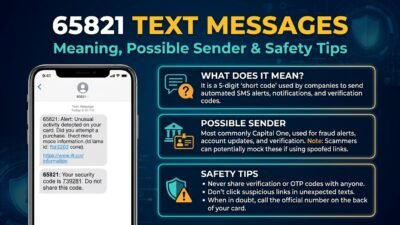

If you received a 87892 text message, you may be wondering who sent it, why it appeared on your phone, and whether you should respond. An unfamiliar short code can create confusion, especially when the message mentions an account, a verification code, a payment, or an urgent action.
The first thing to understand is that 87892 cannot be reliably identified from the number alone. Its meaning depends on the message’s wording, the organization involved, and whether you recently requested a service or interacted with a business.
Some text messages come from legitimate automated notification systems. Others may involve promotional campaigns, account alerts, or attempts to obtain personal information. Therefore, it’s important to verify the sender before clicking a link or sharing any details.
This guide explains how to investigate the 87892 text message, recognize warning signs, protect your information, and decide what to do next. It also explains how to distinguish a legitimate notification from a suspicious message without making assumptions about the sender.
🔎 What Is the 87892 Text Message?
The 87892 text message is associated with Microsoft’s security verification system in published short-code directories. Microsoft also lists 87892 among the short codes it uses for multifactor authentication in the United States.
Multifactor authentication, often called MFA, adds an extra identity check when someone signs in to an account. For example, a service may send a one-time code to your phone after you enter your password.
However, the sender number alone doesn’t prove that every message you receive is genuine. You should also consider the message’s content, your recent account activity, and whether you initiated the sign-in.
Here is a quick overview:
Detail
What you should know
Short code
87892
Commonly associated service
Microsoft verification
Possible purpose
Login verification or multifactor authentication
Unexpected message
Could indicate a mistaken phone number or an attempted sign-in
Safest response
Don’t share the code; verify your account independently
Microsoft confirms that unrequested verification codes can arrive when someone attempts to access an account or accidentally enters another person’s contact information.
📱 Why Did You Receive a Message From 87892?
There are several possible explanations. The correct one depends on what the text says and what you were doing when it arrived.
1. You requested a Microsoft verification code
If you were signing in to Outlook, Xbox, Microsoft 365, or another Microsoft service, the message may be a normal security check.
For instance, you might enter your password on a new device and receive a code to confirm your identity. If you initiated that process yourself, enter the code only on the official sign-in page.
2. Someone entered your phone number by mistake
Another person may have typed your number instead of their own while trying to sign in or recover an account.
In that situation, you could receive a verification code even though you don’t use the service. You don’t need to reply or take action on someone else’s behalf.
3. Someone may be attempting to access your account
An unexpected code can also mean someone has entered your phone number during a login attempt.
If the person has your password, they may be trying to complete an additional verification step. Nevertheless, receiving one code doesn’t prove that anyone has gained access to your account.
Don’t share the code with anyone. If you suspect unauthorized activity, review your account’s recent sign-ins and secure your credentials.
4. A previous verification message arrived late
Occasionally, a message may arrive after the original sign-in attempt. You might no longer remember requesting it, particularly if you tried to log in several minutes earlier.
Even so, don’t use an old code simply because it arrived late. Return to the official service and request a new verification code if you still need one.
🛡️ Is the 87892 Text Message Legitimate or a Scam?
The short code is documented by Microsoft as one of its multifactor authentication numbers for the United States. That supports its legitimate use for security verification.
However, a recognized sender number doesn’t automatically make every message trustworthy. Scammers may imitate legitimate organizations, and an unexpected verification message still deserves attention.
Use these examples to assess your situation.
Situation
What it may indicate
Recommended action
You just requested a code
Normal verification
Use it on the official sign-in page
You received a code without logging in
Mistyped number or unexpected login attempt
Don’t share it; review account activity
Someone calls asking for the code
Possible verification-code scam
Refuse to disclose it
The message demands immediate payment
Potentially suspicious request
Verify through the company’s official website
The text contains an unfamiliar link
Possible phishing attempt
Don’t click; navigate to the official website yourself
Microsoft advises users not to click questionable links or provide personal information in messages they cannot verify.
Microsoft Support
Warning signs to look for
Pay particular attention if the message:
- Claims your account will be permanently closed unless you act immediately.
- Requests your password, payment card details, or complete account recovery information.
- Includes an unexpected link to a sign-in page.
- Asks you to forward a verification code to another person.
- Is followed by a phone call from someone claiming to be technical support.
A genuine verification code is intended to help confirm your identity. It isn’t something you should give to a caller, friend, or supposed support representative.
🔐 What Should You Do If You Didn’t Request the Code?
If you receive an unexpected 87892 text message, you can protect your account without panicking. Follow these steps in order.
1. Don’t share the verification code
Keep the code private, even if someone claims to be a Microsoft employee or says they need it to cancel a login attempt.
2. Open the official website yourself
Type account.microsoft.com or account.live.com into your browser rather than following a link in an unexpected message.
3. Review recent sign-in activity
Look for unfamiliar locations, devices, or login attempts. Investigate anything you don’t recognize through Microsoft’s official account security tools.
4. Secure your account if necessary
If you find suspicious activity or believe someone knows your password, change it and review your recovery methods. Enable a suitable additional verification method.
5. Ignore repeated unsolicited codes
Don’t respond to login attempts you didn’t initiate. If the messages continue, use Microsoft’s official support resources to investigate the issue.
These steps follow Microsoft’s guidance for handling verification codes that arrive unexpectedly.
💻 Which Microsoft Accounts Could Be Involved?
An unexpected verification message may relate to a Microsoft account you use regularly or one you haven’t accessed recently.
Potentially relevant services include:
- Outlook: Email access and account sign-in.
- Microsoft 365: Word, Excel, and other productivity services.
- Xbox: Gaming accounts and related sign-in activity.
- OneDrive: Cloud storage and access to personal files.
- Microsoft work or school accounts: Organizational accounts protected by multifactor authentication.
These are examples of Microsoft services, not proof that a particular service generated your text. The actual purpose depends on the sign-in request and the message itself.
If you have several accounts, check each relevant account rather than assuming the message relates to your primary email address.
Microsoft also notes that multifactor authentication short codes can vary by country or region and that delivery isn’t guaranteed to use the same number every time.
🚨 What If Someone Asks You to Read Out the Code?
This is one of the most important situations to understand.
A scammer may contact you by phone, email, or another messaging app and claim that your account is under attack. They might say they can stop the attack if you provide the code sent to your phone.
Don’t do it.
The person may be trying to complete a sign-in using your verification code. If you give them the code, you could help them bypass an important security check.
Consider this realistic example:
You receive a verification code from 87892. A few seconds later, someone calls and claims to work for Microsoft. They ask you to read the code aloud to confirm your identity.
The safest response is to refuse, end the conversation, and independently check your account activity. Don’t rely on the caller’s phone number, display name, or explanation as proof of identity.
Microsoft advises users not to provide personal information or trust unsolicited technical-support messages.
🧩 Can You Receive an 87892 Text Without Having a Microsoft Account?
Yes, this is possible, although the precise reason may not be immediately clear.
Someone might have entered your phone number by mistake while attempting to sign in or recover an account. Alternatively, a number previously associated with another person could still be connected to an account.
You may also have an older Microsoft account that you’ve forgotten about.
Here’s how to approach the situation:
- Check whether you recently signed in to any Microsoft service.
- Think about whether you have an old Outlook, Xbox, or Microsoft 365 account.
- Avoid clicking links or replying with sensitive information.
- If you’re concerned, visit Microsoft’s official website and use its account recovery or security resources.
You don’t need to create a Microsoft account just to respond to an unexpected verification code. If you didn’t initiate the request, simply leave the code unused.
📩 Should You Reply STOP or Block 87892?
The right approach depends on the type of message you received.
For an unexpected security verification code, don’t automatically reply STOP. First, determine whether the message is a legitimate authentication notification. You can simply ignore a code you didn’t request and investigate your account independently.
For unwanted promotional messages, the situation may be different. If the text clearly identifies a legitimate subscription service and provides opt-out instructions, following those instructions may stop future marketing messages.
Blocking the sender is another option, but it may also prevent you from receiving legitimate verification codes later.
Action
When it makes sense
Ignore the code
You didn’t initiate the sign-in
Check your account
You suspect an unauthorized login
Reply STOP
A recognizable, legitimate service offers an opt-out for unwanted messages
Block the sender
Messages are unwanted or persistently abusive
Contact official support
You suspect account compromise or cannot identify the activity
If you’re unsure whether a message is legitimate, avoid replying until you’ve verified its source. Never send passwords or verification codes in response to an unexpected request.
🌐 Does the 87892 Short Code Work in Every Country?
No. Short-code messaging depends on the service, country, mobile carrier, and messaging routes available.
Microsoft’s published multifactor authentication documentation lists 87892 among the short codes used in the United States. The company also explains that the available codes vary by region.
Consequently, someone receiving a message in the United States may have a different experience from someone using a phone number registered in Pakistan or another country.
If you live outside the United States and receive this text, don’t assume that the message is fraudulent simply because you don’t recognize the number. However, don’t assume it’s genuine either.
Verify the service independently, especially if the message contains a link or asks you to take an unfamiliar action. Your mobile carrier may also be able to explain whether it supports the relevant short-code messages.
🛠️ How to Protect Your Microsoft Account From Future Alerts
An unexpected verification message can be a useful reminder to review your digital security. You don’t need to wait until you receive suspicious texts to take preventive steps.
Consider these practical habits:
- Use a strong, unique password. Avoid reusing the same password across email, shopping, and social media accounts.
- Enable multifactor authentication. Use an available authenticator app or another supported method when appropriate.
- Review recovery information. Make sure your recovery email address and phone number are current.
- Check sign-in notifications. Investigate unfamiliar activity instead of dismissing repeated alerts.
- Keep your devices updated. Install security updates for your operating system, browser, and messaging apps.
- Avoid suspicious links. Open important accounts directly through their official websites or applications.
For additional guidance, visit Microsoft’s or read its.
❓ Frequently Asked Questions About the 87892 Text Message
1. What does the 87892 text message mean?
The number 87892 is listed by Microsoft as a short code used for multifactor authentication in the United States. A message may contain a verification code related to a sign-in or identity check. If you didn’t request it, leave the code unused and review your account security.
2. Is 87892 a real Microsoft verification number?
Yes. Microsoft’s official documentation lists 87892 among its multifactor authentication short codes for the United States. Nevertheless, the number alone cannot establish that every message claiming to come from Microsoft is trustworthy. Check the message and verify your account independently.
3. Why did I receive a Microsoft code when I wasn’t logging in?
Someone may have entered your phone number accidentally, or another person may have attempted to access an account associated with it. A delayed message is another possibility. Don’t share the code, and check your recent account activity if you suspect an unauthorized attempt.
4. Can someone access my account using the code sent to my phone?
A verification code can help someone complete an authentication process if they also have the information required for that sign-in. That’s why you should never share a code with another person. If you suspect someone knows your password, change it and review your account security settings.
5. Should I click a link in an 87892 message?
Only proceed after independently verifying that the link is legitimate and relevant to an action you initiated. When in doubt, don’t click it. Instead, open the official Microsoft website directly and check your account from there.
Microsoft Support
6. What should I do if I receive several codes in a row?
Repeated codes you didn’t request may indicate repeated sign-in attempts, accidental requests, or another issue. Don’t share any of the codes. Review your recent sign-in activity, secure your password if needed, and consult official support if the messages continue.
7. Can I block 87892 permanently?
You can check your phone’s messaging settings or contact your mobile carrier about blocking the sender. However, doing so may prevent legitimate verification messages from reaching you. Consider investigating unexpected codes first, particularly if you rely on text messages for account security.
✅ Final Thoughts
The 87892 text message is associated with Microsoft’s multifactor authentication system in the United States, but receiving a message doesn’t automatically mean your account has been compromised. You might have requested a code, someone might have entered your number accidentally, or an unexpected sign-in attempt may have triggered the notification. The safest approach is to keep verification codes private, avoid suspicious links, and check your account through official channels. If you didn’t request the message, don’t use or share the code. A few simple precautions can help you protect your personal information without unnecessary worry.