If you searched for 7726Text message, you may have received a text involving the number 7726 and wondered whether it is a normal message, a warning, or a scam. In many countries and mobile networks, 7726 is associated with reporting unwanted or suspicious text messages. The number is memorable because 7726 spells “SPAM” on a phone keypad.
However, context matters. A message involving 7726 doesn’t automatically mean that your phone has been hacked or that the original sender is legitimate. In many cases, 7726 is simply the destination used to report spam or scam messages to a mobile provider.
This guide explains what a 7726Text message can mean, why you might see it, how the reporting system works, and what you should do if a suspicious message reaches your phone.
What Does 7726 Mean in a Text Message?
The number 7726 is commonly used for reporting spam text messages.
It isn’t generally a texting abbreviation like “LOL,” “BRB,” or “IDK.” Instead, it functions as a special reporting number used by participating mobile networks and organizations.
The idea is simple. You receive a suspicious or unwanted SMS, then forward that message to 7726. Your mobile provider can use the report to investigate spam activity and improve its filtering systems. The FTC recommends forwarding unwanted texts to 7726, while the UK’s National Cyber Security Centre describes the same number as a way to report suspicious SMS messages.
The number is easy to remember because 7-7-2-6 corresponds to S-P-A-M on a traditional telephone keypad.
So, if you see 7726 in instructions about reporting a suspicious message, it usually refers to spam reporting rather than a secret texting code.
Why Would You Receive a Message About 7726?
There are several possible reasons.
Most importantly, receiving a message connected with 7726 does not necessarily mean you personally did anything wrong.
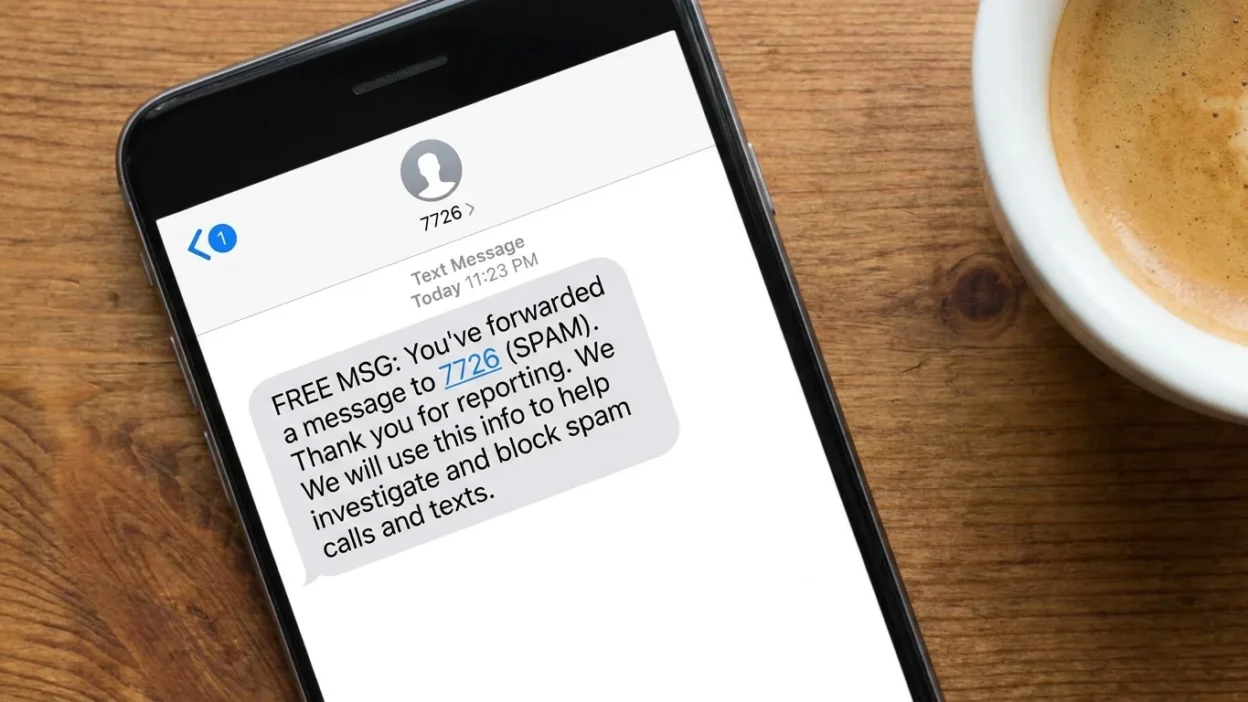
For example, your carrier may send an automated confirmation after you report spam. You might also encounter 7726 while reading instructions from a phone provider or government agency.
In another situation, you may have searched for the number because an unfamiliar message told you to forward something to 7726.
Here are common possibilities:
- You reported an unwanted text.
- Your mobile provider confirmed a spam report.
- A carrier instructed you to report a suspicious message.
- You found 7726 in anti-spam instructions.
- You received a suspicious message and are checking whether 7726 is legitimate.
- You are confusing 7726 with the sender’s original phone number.
Therefore, the surrounding message matters more than the number alone.
Is 7726 a Real Number for Reporting Spam?
Yes, 7726 is a genuine spam-reporting system used by many participating mobile providers and organizations.
The FTC in the United States advises consumers to forward unwanted texts to 7726. The UK’s NCSC also says most phone providers participate in a scheme that allows customers to report suspicious texts through 7726.
The Canadian government’s Get Cyber Safe program also explains how consumers can forward suspicious messages to 7726.
Still, availability and procedures can vary by country and carrier.
That distinction is important. 7726 is widely recognized, but it isn’t a universal texting destination that works identically on every network worldwide.
If your carrier doesn’t support 7726, its own spam-reporting system may be the appropriate alternative.
Does 7726 Mean Your Phone Has Been Hacked?
Usually, no.
Seeing 7726 in a message doesn’t by itself indicate that your phone has been hacked. In fact, the number is commonly connected with efforts to identify and reduce spam.
- For example, if you forward a suspicious message to 7726, your provider may analyze the report. That process doesn’t mean your device has been compromised.
- The bigger concern is the content of the original message.
- A suspicious text may pretend to come from a bank, delivery company, government agency, employer, or another trusted organization. Scammers commonly use urgency, unexpected payment requests, fake account alerts, or links designed to steal information.
Consequently, don’t judge a message by the presence of 7726 alone. Look at what the message actually asks you to do.
How 7726 Helps Fight Spam Text Messages
Spam reporting works because mobile providers can use reports to identify patterns.
- Suppose thousands of people receive similar unwanted messages. When users report those messages, providers gain additional information about the campaign.
- That information can help improve spam filters and support investigations.
- For instance, Rogers explains that reports sent to 7726 help identify new types of spam and improve filtering.
- Similarly, the FTC says forwarding unwanted texts to 7726 helps wireless providers spot and block similar messages.
The process doesn’t guarantee that every unwanted message will disappear immediately. However, reporting gives providers useful information instead of simply deleting the message without notifying anyone.
What Should You Do If You Receive a Suspicious Text?
Your safest response depends on the message.
If you don’t recognize the sender and the text contains a suspicious link, unexpected payment request, or urgent demand for personal information, don’t click the link.
You also shouldn’t provide passwords, banking information, identification numbers, or verification codes through an unexpected message.
- Stop and inspect the message.
- Don’t click unfamiliar links.
- Don’t provide personal information.
- Don’t call a number supplied by a suspicious text.
- Report the message through your phone or carrier.
- Forward it to 7726 if your carrier supports the service.
- Delete the message after reporting it.
The FTC specifically advises consumers not to click links or respond to unexpected texts.
That pause can make a major difference. Scammers often create pressure so that people act before thinking.
How to Report a Spam Text to 7726
The exact steps depend on your phone.
- On many iPhones, you can press and hold the suspicious message, select the appropriate message options, choose forwarding, and enter 7726 as the recipient.
- On Android phones, the process may involve opening the message, pressing and holding it, selecting the forward option, and entering 7726.
- The interface can differ between messaging apps and phone models. The UK’s NCSC provides similar forwarding instructions for both iPhone and Android devices.
- Some messaging apps also provide a Report Spam, Report Junk, or similar option. In those cases, you may be able to report the message directly without manually forwarding it.
If 7726 doesn’t work on your network, check your carrier’s official reporting method.
Should You Reply to a Suspicious Message?
In many cases, you shouldn’t.
An unknown sender may be trying to confirm that your phone number belongs to a real person. Replying can sometimes signal that your number is active.
- For that reason, the UK’s Ofcom advises consumers not to reply to suspicious messages from unknown senders, even if the message appears to offer an opt-out.
- There is an important distinction, though.
- If you recognize the company and the message is a legitimate marketing message, an unsubscribe instruction such as STOP may be appropriate. Ofcom notes that known senders and legitimate marketing messages can have different opt-out considerations.
- Therefore, don’t blindly reply “STOP” to every suspicious text.
First determine whether the sender is trustworthy.
7726 and Scam Text Messages: What’s the Connection?
The connection is mainly about reporting, not creating the scam.
- A scammer may send hundreds or thousands of fraudulent messages. Those messages might impersonate a bank, courier, retailer, government organization, or another familiar service.
- These scams are often called smishing, a term formed from “SMS” and “phishing.”
- A typical example might say:
- “Your package could not be delivered. Confirm your address immediately.”
- Another might claim:
- “Your account has been suspended. Verify your information now.”
- The goal is often to make you click a malicious link or reveal sensitive information.
- Ofcom warns that fake delivery messages may lead victims to websites designed to steal payment information or personal data.
If you receive this type of message, don’t use the link supplied in the text. Instead, visit the company’s legitimate website or use an official app you already trust.
Common Situations Where 7726 Appears
The number can appear in several everyday situations.
- You may receive an automated response after forwarding a suspicious message.
- That’s generally part of the reporting process.
- A website, carrier, or government agency may tell you to forward suspicious texts to 7726.
- In this situation, the number isn’t the sender. It’s the reporting destination.
- Some networks use automated short codes for various service notifications. Therefore, don’t assume every short number has the same function across all carriers.
- This is another common reason people look up 7726. They may simply want to verify whether the number is legitimate.
- That’s a sensible precaution, particularly when an unfamiliar message asks for money or personal information.
Is Every Message From 7726 Safe?
The number itself is associated with spam reporting, but you should still evaluate the actual message and your carrier’s information.
A trustworthy reporting system doesn’t mean that every message mentioning 7726 is automatically authentic.
For example, a scammer could mention a legitimate number in a fraudulent message to make the message appear more convincing.
This is why context matters.
If a message tells you to click a link, pay a fee, reveal a password, or provide a verification code, treat that request separately from the number 7726.
A familiar-looking number doesn’t make an unexpected request safe.
What 7726 Does Not Mean
Several misunderstandings can arise around this number.
- It doesn’t usually mean “your phone is hacked.” There is no general rule that seeing 7726 indicates a compromised device.
- It isn’t a standard texting abbreviation. Unlike common chat terms, 7726 primarily functions as a spam-reporting destination.
- It doesn’t identify every scammer. Reporting a message helps providers investigate spam, but it doesn’t guarantee that the sender will immediately disappear.
- It isn’t necessarily the sender of the original message. In many cases, 7726 is where you forward an unwanted message.
- It doesn’t mean every text involving 7726 is fraudulent. Legitimate carriers and government agencies can reference the number when explaining spam reporting.
Understanding these differences can prevent unnecessary panic.
7726 on iPhone vs. Android
The basic idea is similar on both platforms.
The main difference is the messaging interface.
On an iPhone, the Messages app may provide options for forwarding or reporting junk. Android phones can offer similar features, although the exact buttons depend on the messaging application.
For example, Google Messages may provide built-in spam protection and reporting features, while other Android messaging apps can use different menus.
Therefore, don’t worry if your screen doesn’t match someone else’s instructions exactly.
Look for options such as:
- Report spam
- Report junk
- Forward
- Block
- Delete
If your carrier supports 7726, forwarding the suspicious SMS there can provide an additional reporting route.
Common Mistakes People Make With 7726
Even when people understand that 7726 relates to spam, a few mistakes are common.
- Don’t open a questionable link simply because you’re curious about the message.
- Instead, verify the claim independently.
- A fraudulent message may provide a phone number controlled by the scammer.
- If a text claims to come from your bank, use the number printed on your card or another trusted source.
- Urgency is a common social-engineering technique.
- Take a moment to check the sender and verify the claim.
- The number usually serves as a reporting destination.
- It shouldn’t automatically be interpreted as the original source of a message.
- Never assume that a text message is trustworthy simply because it appears professional.
- Unexpected verification codes can be particularly sensitive.
What If You Already Clicked a Suspicious Link?
The next step depends on what happened after you clicked.
- If you only opened a suspicious page and didn’t enter information, close it and avoid interacting further. Then consider running the security checks available on your device.
- If you entered a password, change that password through the legitimate service’s official website or app. If you reused the same password elsewhere, change those accounts too.
- If you provided banking or payment information, contact the relevant financial institution promptly.
- If you downloaded an unfamiliar application or file, take additional security precautions.
- Verizon similarly advises people who clicked a suspicious message or provided information to take steps to secure affected accounts and contact relevant financial institutions or services.
Most importantly, don’t continue communicating with the suspicious sender.
Can You Trust a Text That Mentions Your Name?
Not necessarily.
Scammers can use personal information to make messages look convincing. A message containing your name, approximate location, or a company you recognize isn’t automatically legitimate.
The UK’s NCSC notes that criminals can use information available online, including information from social media, to make phishing messages more convincing.
Consequently, judge the request rather than the personalization.
Ask yourself:
- Was I expecting this message?
- Did I recently contact this company?
- Is the sender’s information authentic?
- Does the message create unnecessary urgency?
- Does it ask for sensitive information?
- Does it contain an unfamiliar link?
- Can I verify the claim independently?
These questions can expose many suspicious messages quickly.
Why the 7726 System Is Useful
Spam filters can catch many unwanted messages, but no filtering system is perfect.
- New scams appear regularly. Fraudsters can also change phone numbers, wording, domains, and sender identities.
- User reports provide another layer of information.
- When people report suspicious texts, providers can learn more about emerging campaigns. Rogers, for example, says that 7726 reports help improve its ability to identify and filter new spam patterns.
- The system therefore works best when people report genuine suspicious messages rather than ignoring every unwanted text.
Reporting also takes very little effort compared with the potential value of identifying a wider campaign.
7726 Meaning in Different Countries
One important point often missing from simple explanations is that mobile reporting systems can vary by country.
In the United States, the FTC recommends 7726 for reporting unwanted texts.
The UK also widely uses 7726 for suspicious SMS reporting. The NCSC explains that most UK mobile providers participate in the scheme.
Canadian government guidance likewise describes 7726 as a way to report spam messages.
However, the exact response after reporting can differ between providers.
Therefore, if you’re outside a country where your carrier supports 7726, check your local provider’s spam-reporting instructions.
Is 7726 Free to Use?
In many supported systems, reporting spam through 7726 is free.
For example, the UK’s NCSC describes forwarding suspicious messages to 7726 as free, while the Canadian Get Cyber Safe guidance also states that reporting through the service doesn’t count toward the user’s messaging or data allowance.
Still, mobile policies can vary.
If you’re unsure, check your carrier’s current terms, especially when traveling internationally.
When You Should Not Engage With a Text
A useful rule is simple: unexpected + urgent + sensitive request = stop and verify.
Be especially cautious when a message:
- Demands immediate payment.
- Threatens account closure.
- Claims you’ve won something unexpected.
- Requests a password.
- Requests a security code.
- Asks for banking information.
- Contains a suspicious website.
- Pretends to be a government agency.
- Claims a package requires an unexpected payment.
- Tells you to bypass normal security procedures.
The FTC has repeatedly warned that scammers use unexpected texts to pressure people into giving money or personal information.
In contrast, legitimate organizations generally give you safer ways to verify an account issue independently.
Frequently Asked Questions About 7726Text message
What does 7726 mean in a text message?
7726 commonly means SPAM when entered on a phone keypad. It is widely used by participating mobile carriers as a number for reporting unwanted or suspicious text messages.
Why would someone tell me to text 7726?
They may be instructing you to report an unwanted or suspicious message. Mobile providers use reports sent to 7726 to help identify spam and improve filtering.
Is 7726 a scam number?
7726 itself is commonly used as a legitimate spam-reporting destination. However, a message that merely mentions 7726 isn’t automatically trustworthy. Evaluate the entire message before taking action.
Does 7726 mean my phone has been hacked?
Usually not. The number is primarily associated with reporting spam. Seeing it doesn’t, by itself, provide evidence that your phone has been compromised.
Should I forward spam texts to 7726?
If your mobile carrier supports the service, forwarding suspicious or unwanted SMS messages to 7726 can help your provider identify and filter similar spam. The FTC recommends this reporting method in the United States.
Should I reply STOP to a suspicious message?
Not automatically. If the sender is unknown and the message appears suspicious, replying can confirm that your number is active. Ofcom advises against replying to suspicious texts from unknown senders.
What if 7726 doesn’t work for me?
Your carrier may not support the service in the same way, or your messaging application may handle reporting differently. Try your phone’s built-in spam-reporting feature or check your mobile provider’s instructions.
Is 7726 the same as a normal phone number?
No. In this context, 7726 is a short code used for spam reporting, rather than an ordinary personal telephone number. Its availability and exact function depend on the country and participating carrier.
Final Thoughts on 7726Text message
A 7726Text message can seem confusing when you first encounter the number. Fortunately, its most common purpose is straightforward: 7726 is widely used to report spam and suspicious text messages.
The number represents “SPAM” on a traditional phone keypad, making it easier to remember.
If you receive an unexpected message, focus on the content rather than the number alone. Don’t click questionable links, don’t share sensitive information, and don’t allow an urgent message to pressure you into making a quick decision.
When appropriate, report the suspicious SMS through your carrier or forward it to 7726 if the service is supported in your region. You can also use your phone’s built-in spam-reporting tools.
Most importantly, remember that 7726 is generally a reporting tool, not a warning that your phone has been hacked. Understanding that distinction can help you respond calmly and safely when an unfamiliar text appears.